Living in an apartment shouldn’t mean sacrificing your cycling fitness goals when the weather turns foul. Yet for many urban cyclists, the fear of noise complaints has turned indoor training into a source of anxiety rather than empowerment. The solution? Direct-drive smart trainers have revolutionized apartment-friendly cycling by eliminating the roar of traditional wheel-on trainers and replacing it with a whisper-quiet experience that won’t have your downstairs neighbor banging on the ceiling.
Unlike their wheel-on counterparts that create friction against your tire, direct-drive trainers connect directly to your bike’s drivetrain, removing the largest source of noise and vibration from the equation. When paired with smart technology that automatically adjusts resistance and connects to virtual training platforms, these devices transform a corner of your living room into a sophisticated training studio. But not all direct-drive trainers are created equal, especially when silence is your top priority. Let’s dive deep into the features, specifications, and considerations that separate the truly apartment-friendly options from those that might still earn you a stern note from your landlord.
Top 10 Direct-Drive Smart Trainers for Quiet Apartment Workouts
Detailed Product Reviews
1. Elite Rivo Zwift Ready Smart Trainer - Direct Drive Bike Trainer with Virtual Shifting, ±2.5% Power Accuracy, WiFi + Bluetooth, Quiet Operation, Compact Foldable, Cog & Click Included

Overview: The Elite Rivo Zwift Ready Smart Trainer arrives as a complete package for virtual cycling enthusiasts, featuring pre-installed Zwift Cog and Click systems that enable 24 virtual gears controllable from your handlebars. This direct-drive trainer eliminates derailleur adjustments and works seamlessly with 8-12 speed drivetrains, making it genuinely plug-and-play for both newcomers and experienced riders seeking hassle-free indoor training.
What Makes It Stand Out: True out-of-the-box Zwift integration sets this apart. The virtual shifting system removes cassette compatibility headaches entirely—no mechanical gears to adjust, just silent electronic shifts. WiFi connectivity with automatic firmware updates ensures you’re always current, while dual Bluetooth channels let you simultaneously connect to apps and heart rate monitors. The Supertuck mode for instant aero positioning and Easy Start function for smooth interval resumption demonstrate thoughtful software integration.
Value for Money: At $569.99, this trainer punches above its weight. The included Zwift Cog and Click system ($100+ value) plus a 12-month My E-Training subscription justify the premium over basic trainers. You’re getting mid-range performance—±2.5% accuracy, 18% gradient simulation, 2,100W max output—at a price hundreds less than flagship models from Wahoo or Tacx, while avoiding separate cassette purchases.
Strengths and Weaknesses: Strengths include genuine plug-and-play setup, ultra-quiet operation perfect for apartments, compact foldable design with carry handle, and robust app connectivity. The virtual shifting system is revolutionary for Zwift purists. Weaknesses: ±2.5% accuracy trails premium trainers’ ±1% standards, the 18% gradient limit may disappoint mountain climbers, and Elite’s software ecosystem lags behind Zwift’s native experience.
Bottom Line: This is the ideal trainer for Zwift devotees wanting seamless virtual shifting without mechanical complexity. The all-inclusive package and competitive pricing make it a smart choice for apartment dwellers and dedicated indoor cyclists prioritizing convenience and quiet operation.
2. Elite Rivo Direct Drive Smart Trainer - Indoor Cycling Trainer, ±2.5% Power Accuracy, WiFi + Bluetooth, Ultra-Quiet, Compact Foldable, Zwift Compatible (Cassette Not Included)

Overview: The Elite Rivo Direct Drive Smart Trainer delivers the same core performance as its Zwift Ready sibling but strips away the pre-installed cassette system to offer flexibility at a lower entry price. This $549.99 trainer maintains identical power metrics and connectivity while letting you use your existing 9-12 speed Shimano/SRAM cassette or upgrade to Zwift’s virtual shifting system later.
What Makes It Stand Out: The upgrade path distinguishes this model. You get the same ±2.5% power accuracy, 18% gradient simulation, and 2,100W max output as the premium version, plus identical WiFi and dual Bluetooth connectivity. The ability to run your own mechanical cassette initially, then transition to virtual shifting when ready, provides rare future-proofing. Two standalone modes function without power or apps, and the 10kg frame remains highly portable.
Value for Money: Saving $20 upfront is modest, but the real value emerges if you own a spare cassette. Avoiding the $100+ Cog/Click system keeps initial costs down while preserving upgrade options. Performance per dollar matches the best entry-level smart trainers, and the included 12-month My E-Training subscription adds substantial value. It’s a pragmatic choice for budget-conscious cyclists who don’t mind manual installation.
Strengths and Weaknesses: Strengths include identical performance specs to the higher-priced model, flexible upgrade path, ultra-quiet operation, compact folding design, and excellent connectivity. The lightweight build aids storage. Weaknesses: Requires cassette purchase/installation, lacks instant virtual shifting convenience, needs periodic derailleur adjustments, and the initial setup is more complex for beginners.
Bottom Line: Choose this model if you already own a compatible cassette or prefer mechanical shifting initially. It offers the same robust performance as its pricier counterpart while providing a clear upgrade path, making it perfect for practical cyclists balancing budget and future Zwift integration.
3. Elite Justo Direct Drive Smart Trainer
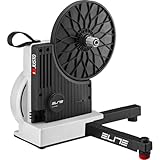
Overview: The Elite Justo Direct Drive Smart Trainer positions itself as Elite’s premium offering at $1,099.99, targeting serious cyclists who demand higher performance specifications. With a steeper 24% maximum gradient simulation and expanded power range reaching 2,300W at 40km/h, this trainer bridges the gap between mid-range models and professional-grade equipment.
What Makes It Stand Out: Superior slope simulation and power handling differentiate the Justo. The 24% gradient capability significantly exceeds the Rivo’s 18%, providing more realistic mountain climbing experiences. ANT+ FE-C protocol compatibility broadens device support beyond Bluetooth-only trainers, ensuring seamless connection to bike computers and sports watches. The robust power ceiling accommodates sprint efforts from elite riders without wattage caps.
Value for Money: This premium pricing aligns with high-end trainers from Wahoo and Tacx. While double the Rivo’s cost, the enhanced gradient simulation, higher power output, and ANT+ connectivity justify the investment for competitive cyclists. However, the lack of included cassette and absence of WiFi/virtual shifting features mean you’re paying purely for mechanical performance gains rather than software innovation.
Strengths and Weaknesses: Strengths include best-in-class gradient simulation, high power ceiling, dual ANT+/Bluetooth connectivity, solid build quality, and broad cassette compatibility. It handles intense training loads reliably. Weaknesses: No WiFi connectivity, no virtual shifting option, requires separate cassette purchase, heavier than Rivo models, and Elite’s software ecosystem remains a weak point.
Bottom Line: The Justo suits dedicated racers and strong riders needing maximum resistance and realistic climbing simulation. If you prioritize raw performance over virtual shifting convenience and already own a premium cassette, this trainer delivers professional-grade training at a competitive premium price point.
Why Direct-Drive Trainers Are Apartment-Friendly Game-Changers
The fundamental difference between wheel-on and direct-drive trainers lies in their mechanical design. Wheel-on trainers press a roller against your rear tire, creating inevitable noise from tire deformation, friction, and vibration transfer through your frame. Direct-drive models remove your rear wheel entirely, connecting your bike’s cassette directly to the trainer’s internal flywheel. This design eliminates the tire-to-roller interface—the primary culprit behind the deafening hum that has made indoor training infamous among apartment dwellers.
The Science Behind the Silence: How Direct-Drive Reduces Noise
Direct-drive trainers reduce noise through several engineering principles. First, they eliminate the high-frequency whine created by tire deformation. Second, they typically house their mechanical components within a sealed unit that dampens sound. Third, the direct connection minimizes vibration transfer to your floor. The result is a system that typically operates between 55-65 decibels at moderate power outputs—roughly equivalent to normal conversation levels—compared to 80-95 decibels for wheel-on models, which approaches the volume of a garbage disposal.
Understanding Smart Trainer Technology: What Makes Them “Smart”?
“Smart” in this context means the trainer can receive commands from external devices and automatically adjust resistance in real-time. This two-way communication enables immersive experiences where virtual hills feel like actual climbs and structured workouts execute themselves without manual intervention. The technology relies on precise power measurement, electromagnetic or motor-driven resistance units, and wireless connectivity protocols that sync with training apps, creating a feedback loop that transforms passive riding into active training.
Key Noise Metrics: What to Look For in Spec Sheets
Manufacturers love to claim their trainers are “whisper-quiet,” but these marketing terms mean nothing without hard data. Understanding the actual noise specifications helps you make an informed decision that won’t jeopardize your lease.
Decibel Ratings Explained: When “Quiet” Actually Means Quiet
Decibel (dB) scales are logarithmic, meaning a 10 dB increase represents a tenfold increase in sound intensity. A trainer rated at 60 dB is exponentially quieter than one at 70 dB. When evaluating specs, look for measurements taken at specific power outputs—typically 200-300 watts—rather than idle measurements. Also note the distance from the device where measurements were taken; reputable manufacturers test at 1-2 meters. Anything under 65 dB at 250 watts is genuinely apartment-friendly, while sub-60 dB performance represents the current gold standard.
Vibration Dampening: The Hidden Factor in Apartment Training
Decibel ratings only tell half the story. Low-frequency vibrations can travel through floor joists even when airborne noise seems minimal. Quality trainers incorporate isolation feet, weighted bases, and internal dampening systems that absorb oscillations before they transfer to your floor. Pay attention to the trainer’s weight—heavier units typically resist vibration better—and look for models with adjustable, rubberized feet that can accommodate uneven apartment floors while creating a buffer between the trainer and your downstairs neighbor’s ceiling.
Power Accuracy: Why It Matters More Than You Think
Power accuracy determines how closely the trainer’s wattage readings match your actual output. While this affects training quality, it also impacts noise levels indirectly. Inaccurate trainers can cause you to overshoot target zones, spinning harder and creating more noise than necessary. Most modern direct-drive trainers claim accuracy within ±1-3%, but the real-world consistency of that accuracy matters more than the marketing claim.
The Wattage Wars: How Precision Affects Your Training
High power accuracy isn’t just for data-obsessed athletes. In apartment settings, it means you can trust that 200 watts on screen is actually 200 watts, preventing the need for constant adjustments that might cause you to surge above your intended output. Look for trainers that specify accuracy across the entire power range, not just at a single test point. Temperature compensation is crucial—trainers without it can drift significantly as they warm up, forcing you to push harder and generate more noise to hit your targets.
Flywheel Weight: The Secret to Realistic Road Feel
Flywheel weight directly influences how realistic your trainer feels and, surprisingly, how much noise it makes. Heavier flywheels maintain momentum better, creating smoother pedal strokes that reduce the vibration spikes associated with choppy cadence. This momentum also means less electronic correction from the resistance unit, which can introduce mechanical noise.
Heavy vs. Light Flywheels: Finding Your Sweet Spot
Flywheels typically range from 4 to 22 pounds (2-10 kg). While heavier generally means better road feel, there’s a practical limit for apartment use. Massive flywheels can create more low-frequency rumble, especially on suspended floors. The sweet spot for most apartment dwellers lies between 10-16 pounds—enough mass for realistic inertia without excessive vibration. Some trainers use virtual flywheel technology, simulating heavier inertia through electronic control rather than physical mass, offering the best of both worlds.
Connectivity Standards: Ensuring Your Devices Play Nice
Your trainer’s ability to communicate seamlessly with your devices determines your training experience quality. Compatibility issues lead to frustrating dropouts that might have you hammering intervals while troubleshooting connections—creating exactly the kind of noise spikes you’re trying to avoid.
ANT+ vs. Bluetooth: Protocols That Power Your Virtual Rides
Most trainers broadcast power and cadence data via both ANT+ and Bluetooth, but implementation quality varies. ANT+ FE-C (Fitness Equipment Control) protocol allows multiple devices to connect simultaneously—useful if you want to record on a bike computer while running Zwift on a tablet. Bluetooth connectivity has caught up with newer standards but can still be finicky with older devices. Look for trainers that explicitly support dual-channel Bluetooth, allowing simultaneous connections to two devices, and ensure the ANT+ implementation is certified rather than just “compatible.”
Compatibility Check: Making Sure Everything Fits
Nothing’s worse than unboxing a $1,000 trainer only to discover it doesn’t fit your bike. Compatibility issues force compromises that can increase noise or create unstable setups.
Axle Standards and Frame Compatibility
Modern direct-drive trainers accommodate most axle standards, but verify support for your specific setup. Quick-release road bikes, 12mm thru-axle mountain bikes, and Super Boost spacing all require different adapters. Some trainers include these adapters; others sell them separately. Check that the trainer’s legs clear your frame’s chainstays—wide-aero frames can interfere with the trainer body, creating annoying clicking noises and instability that amplifies vibration.
Cassette Compatibility: What You Need to Know
Direct-drive trainers require you to install a cassette on their freehub body. Ensure the trainer’s freehub matches your drivetrain—Shimano/SRAM HG, SRAM XD/XDR, or Campagnolo. Some trainers ship with a cassette, but most don’t. Factor this into your budget, and consider noise when selecting cassette ranges. Compact gearing prevents you from grinding big gears at low cadences, which creates more vibration than spinning lighter gears faster.
Space-Saving Features for Cramped Apartments
Apartment real estate is precious. The best trainer is the one you can live with when it’s not in use.
Foldability and Storage Solutions
Look for trainers that fold into compact footprints—some reduce to briefcase size, sliding under beds or into closets. Consider the weight if you’ll be moving it frequently; 45-50 pounds is manageable for most people, but 60+ pounds becomes cumbersome in walk-up apartments. Integrated handles make a huge difference for daily storage routines. Some trainers feature vertical storage stands, allowing you to tuck them into narrow gaps between furniture—perfect for studio apartments where every square foot counts.
Budget Considerations: What Your Money Actually Buys
Direct-drive smart trainers range from $600 to over $1,400, with significant differences in noise performance, accuracy, and features. Understanding the value curve helps you invest wisely without overspending for capabilities you won’t use.
Entry-Level vs. Premium: Breaking Down the Value Proposition
Sub-$800 trainers typically offer solid power accuracy (±2-3%) and acceptable noise levels (65-70 dB) but may lack sophisticated vibration dampening or premium flywheels. Mid-range options ($800-$1,100) deliver the best apartment-friendly features: sub-65 dB operation, excellent accuracy (±1-2%), and good road feel. Premium models above $1,100 provide marginal improvements in accuracy and slightly better noise performance, but often justify their price through durability and advanced features rather than silence alone. For pure apartment training, the mid-range sweet spot offers 90% of the premium experience at 70% of the cost.
Software Ecosystems: The Hidden Cost of Subscription Fatigue
The trainer itself is just the hardware; the real magic happens in software. However, subscription costs can quickly exceed your initial hardware investment, and software choices affect how efficiently you train—impacting noise through workout structure.
Most trainers work with multiple platforms, but some lock advanced features behind proprietary apps. Zwift, TrainerRoad, and Rouvy each cost $15-20 monthly. Factor these into your total cost of ownership. Some trainers include free lifetime subscriptions to basic platforms, which might be sufficient if you’re self-motivated. Consider whether you need the gamification of virtual worlds or just structured workouts—simpler apps often mean fewer graphics-intensive demands on your device, reducing fan noise from overheating tablets or laptops.
Setup and Calibration: Getting It Right the First Time
Improper setup creates noise. A bike that isn’t securely mounted, a misaligned cassette, or inadequate tension on the thru-axle can introduce creaks, clicks, and vibrations that defeat the trainer’s inherent quietness.
The Importance of Regular Calibration
Even the best trainers drift over time. Temperature changes, mechanical wear, and firmware updates affect power accuracy. Spindown calibrations, which measure how long the flywheel coasts to a stop, should be performed every 2-3 weeks or after moving the trainer. Some trainers auto-calibrate, while others require manual intervention. Consistent calibration ensures you’re not overworking to hit power targets, keeping your effort—and noise—at appropriate levels. A well-calibrated trainer runs smoother and quieter than one fighting itself to maintain resistance.
Maintenance Tips to Keep Your Trainer Whisper-Quiet
Direct-drive trainers are relatively low-maintenance, but neglect creates noise. The belt drive systems in most trainers can develop squeaks if dust accumulates. Monthly cleaning of the freehub body and occasional belt tension checks prevent the gradual increase in mechanical noise that might otherwise go unnoticed until your neighbor complains. Keep the firmware updated—manufacturers regularly release optimizations that improve resistance control smoothness, reducing the abrupt changes that create noise spikes during interval transitions.
Apartment-Specific Setup Strategies
Your trainer’s location within your apartment significantly impacts noise transmission. Corner placement is better than center-of-room because corners have more structural support. Avoid placing the trainer near shared walls, especially bedroom walls. If you must train above a neighbor’s living space, schedule sessions during their typical out-of-home hours.
Floor Protection and Neighbor Relations
Invest in a dedicated trainer mat—not just for sweat protection, but for vibration isolation. Quality mats absorb 20-30% of transmitted vibration. For hardwood floors, consider adding a 3/4-inch plywood board under the mat to distribute load and further dampen resonance. Proactively talk to your neighbors: let them know your training schedule and give them your phone number. Most noise complaints stem from surprise rather than actual disturbance. A simple heads-up transforms you from the inconsiderate upstairs cyclist to the thoughtful athlete who respects shared living spaces.
Advanced Features Worth Paying For
Some premium features directly impact apartment livability. Auto-updating firmware ensures optimal performance without manual intervention. Integrated cadence sensors eliminate the need for separate devices that might slip and create noise. Direct-connect ethernet ports provide more stable connections than WiFi, preventing the dropout-induced frustration that leads to angry pedaling and noise spikes. ERG mode smoothing algorithms create more gradual resistance changes, eliminating the jarring transitions that can sound like someone dropping weights. These features might seem minor but collectively create a smoother, quieter, more neighbor-friendly experience.
Frequently Asked Questions
How quiet is “quiet enough” for apartment use?
Trainers operating below 65 decibels at 250 watts are generally safe for apartments with standard construction. However, vibration matters as much as sound. Look for models with rubber isolation feet and place them on a quality trainer mat to reduce structure-borne noise that decibel ratings don’t capture.
Will my downstairs neighbor actually hear my direct-drive trainer?
Possibly, but it’s unlikely to be disruptive. The primary noise path is vibration through floor joists, not airborne sound. Use a trainer mat, avoid early morning or late-night sessions, and consider a plywood isolation board. Most neighbors report they hear nothing, or just a faint hum that blends into background noise.
Do I need to buy a special cassette for my trainer?
You need a cassette that matches your bike’s drivetrain, but it doesn’t have to be expensive. A mid-range cassette like Shimano 105 or SRAM Rival provides excellent performance without the premium cost of top-tier options. The trainer’s freehub body must match your cassette type—HG, XD/XDR, or Campagnolo.
Can I use a mountain bike on a direct-drive trainer?
Yes, if the trainer supports your axle standard. Most accommodate 12x142mm and 12x148mm Boost thru-axles with included adapters. However, mountain bike knobby tires (even removed) can leave residue, and the wider Q-factor might feel awkward. Clean your drivetrain thoroughly before indoor use to avoid grinding dirt into the trainer’s mechanisms.
How much space do I really need?
You’ll need roughly a 6x8 foot area for comfortable riding, but the trainer itself folds to about 2x2 feet for storage. Some ultra-compact models reduce to briefcase size. Consider ceiling height too—if you’re over 6 feet tall on a large bike, ensure you have enough headroom when standing on the pedals.
Is ERG mode louder than standard resistance mode?
ERG mode can be slightly noisier during rapid intervals because the trainer makes quick resistance adjustments. However, modern trainers with good smoothing algorithms minimize this. The overall noise difference is negligible compared to the sound of your drivetrain and ventilation fan, which you’ll need either way.
Do I need a fan if I’m training in a small apartment?
Absolutely. Without adequate cooling, you’ll overheat within 15-20 minutes, reducing performance and creating more movement and noise as you struggle. A quiet, directed fan is essential equipment. Look for fans rated under 50 decibels, and position it to minimize noise transmission through walls.
Will using a trainer damage my apartment floors?
Standard trainer use won’t damage properly installed flooring, but sweat is corrosive and can ruin hardwood or carpet. Always use a trainer mat to catch sweat and distribute the load. For added protection on hardwood, place a 3/4-inch plywood board under the mat to prevent indentations from the trainer feet.
How often should I calibrate my trainer for optimal noise performance?
Perform a spindown calibration every 2-3 weeks or after moving the trainer. Temperature changes affect accuracy, which can cause you to work harder than intended and generate more noise. Some high-end trainers auto-calibrate every ride, maintaining optimal performance without manual intervention.
Can I reduce trainer noise further with aftermarket modifications?
Yes, but be cautious. Upgrading to a higher-quality cassette reduces chain noise. Some users add additional rubber isolation pads under the trainer feet, though this can affect stability. Never void your warranty by opening the trainer housing. The best modifications are external: better mats, strategic placement, and communication with neighbors.