Golf has always been a game of millimeters and microseconds, where the difference between a birdie and a bogey often hides in the invisible mechanics of your swing. Enter the era of golf swing sensors—compact, intelligent devices that transform every practice session into a data-rich masterclass. These aren’t just fancy gadgets for tech enthusiasts; they’re legitimate coaching tools that democratize the kind of swing analysis once reserved for tour professionals with unlimited budgets.
Real-time feedback has fundamentally changed how golfers improve. Instead of guessing what went wrong after a poor shot, you now get instant, objective data that tells the complete story—clubhead speed at impact, swing path deviation, face angle, tempo, and dozens of other metrics that actually matter. But here’s the challenge: not all swing sensors are created equal, and the market is flooded with options that promise everything from tour-level accuracy to AI-powered swing overhauls. This guide cuts through the marketing noise to help you understand what truly matters when investing in a golf swing sensor for real-time coaching.
Top 10 Golf Swing Sensors for Real-Time Coaching
Detailed Product Reviews
1. MOXI SwingMotion Golf Swing Analyzer – Dual Wearable IMU Sensors for Real-Time BioFeedback & 3D Visualization via App – Improve Wrist, Torso, Hip & X-Factor with 4 Training Modes
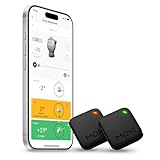
Overview: The MOXI SwingMotion represents a premium biomechanical approach to golf improvement, utilizing dual Inertial Measurement Unit (IMU) sensors to capture comprehensive data about your swing mechanics. This system tracks wrist angles, torso rotation, hip movement, and the critical X-Factor separation between upper and lower body. Designed for serious golfers seeking deeper insights than traditional single-sensor systems provide, it transforms complex motion data into actionable feedback through detailed 3D visualization and real-time analysis.
What Makes It Stand Out: Unlike single-point sensors, the dual-IMU configuration captures the dynamic relationship between upper and lower body movements simultaneously. The four dedicated training modes—Wrist Tracking, Torso, Hip, and Separation—allow golfers to isolate and improve specific swing components. The free companion app eliminates subscription fatigue common with competitors, offering instant analytics, metric graphs, and historical shot review without recurring costs. The 3D avatar playback provides visual learners with an intuitive representation of their swing plane and rotational sequencing.
Value for Money: At $322.20, the MOXI SwingMotion sits in the premium tier but justifies its price through comprehensive dual-sensor coverage that would otherwise require multiple devices. Compared to hiring a biomechanics coach or purchasing separate wrist and torso trackers, this integrated solution offers significant savings. The absence of subscription fees means the total cost of ownership remains fixed, making it more economical than systems with mandatory annual memberships after just two years of use.
Strengths and Weaknesses: Pros: Dual-sensor architecture captures complete kinematic sequence; No ongoing subscription costs; Highly detailed 3D visualization; Four specialized training modes; Lightweight, unobtrusive sensors. Cons: Premium price point may deter casual golfers; Steeper learning curve for data interpretation; Requires consistent sensor placement for accuracy; App interface could overwhelm beginners with data density.
Bottom Line: The MOXI SwingMotion is ideal for dedicated golfers committed to understanding and optimizing their biomechanics. Its dual-sensor approach provides insights unattainable with single-point systems, making it worth the investment for players serious about breakthrough improvements. Casual golfers may find the data complexity and price excessive for their needs.
2. Blast Motion Golf Swing & Stroke Analyzer - Real-time Feedback, Swing Metrics, Swing Trainer, Video Capture Highlights, Track Performance (GEN3 Sensor)

Overview: Blast Motion’s GEN3 sensor delivers a streamlined, professional-grade swing analysis experience trusted by PGA Tour players and over 200 collegiate programs. This compact device attaches to your club grip and automatically captures sophisticated metrics for both full swings and putting strokes. The system emphasizes immediate, actionable feedback sent directly to your smartphone, enabling rapid skill acquisition through its patented Smart Video Capture technology that auto-clips and overlays metrics onto your swing footage.
What Makes It Stand Out: Blast’s greatest strength lies in its ecosystem maturity and professional validation. The Air Swings mode allows effective practice without striking a ball—perfect for indoor training during off-seasons. The video auto-clipping feature eliminates tedious manual editing, instantly creating highlight reels with synchronized metrics. Its dual functionality for both full swings and putting provides comprehensive game coverage from tee to green, while the included one-month membership grants access to advanced training content used by elite players.
Value for Money: Priced at $149.95, the Blast Motion sensor offers professional-level technology at a mid-range price point. The GEN3 sensor’s durability and proven accuracy provide excellent ROI compared to launch monitors costing thousands. However, the value proposition depends on continued membership ($9.99/month after the first free month) for premium features. For committed golfers, this subscription unlocks pro-level drills and comparative data, but casual users can still benefit from core metrics without ongoing payment.
Strengths and Weaknesses: Pros: Trusted by professionals and elite amateurs; Excellent video integration with auto-clipping; Air Swings mode for indoor practice; Works for both full swing and putting; Robust app with historical tracking. Cons: Requires ongoing subscription for full feature access; Single sensor limits body movement analysis; Attachment to grip may affect feel for some players; Limited battery life necessitates regular charging.
Bottom Line: Blast Motion GEN3 is the sweet spot for intermediate to advanced golfers wanting tour-proven feedback without breaking the bank. Its video capture capabilities and dual swing/putting functionality make it more versatile than speed-only devices, though the subscription model requires commitment to maximize value. Perfect for golfers who learn best through visual feedback and structured practice.
3. Arccos Smart Sensors: Automatic Golf Game Tracking System, A.I. Powered Caddie, A.I. GPS Rangefinder & Smart Club Distances

Overview: Arccos transforms your entire bag into a data-capturing ecosystem with 14 club sensors and a specialized putter sensor, automatically tracking every shot without manual input. As the PGA Tour’s official game tracker, it leverages artificial intelligence to provide a digital caddie experience, offering club recommendations and strategy insights based on your historical performance data. The system operates hands-free, capturing shot locations, distances, and outcomes while you focus purely on playing.
What Makes It Stand Out: The comprehensive 16-sensor setup eliminates the need to tap or trigger before shots—a common friction point with competitors. Its AI-powered GPS rangefinder represents a breakthrough, adjusting yardages in real-time for wind (including gusts), elevation, temperature, humidity, and altitude—factors even expensive laser rangefinders ignore. The Smart Club Distances feature accounts for actual performance conditions rather than idealized range numbers, giving golfers realistic expectations for on-course decision-making.
Value for Money: At $200 with the first year’s membership free, Arccos presents strong initial value, but requires a $155.88 annual subscription thereafter. This recurring cost must be factored into long-term ownership. For golfers playing 40+ rounds annually, the per-round cost becomes reasonable, especially considering the AI caddie insights that could save multiple strokes per round. However, casual players may struggle to justify the ongoing expense compared to one-time purchase alternatives.
Strengths and Weaknesses: Pros: Completely automatic shot tracking; Tour-validated accuracy; Revolutionary AI rangefinder with environmental adjustments; Full bag coverage with 16 sensors; Excellent post-round analytics and strokes gained analysis. Cons: Mandatory subscription after year one; Putter sensor can be finicky on short putts; Smartphone must remain in front pocket for optimal detection; Sensor batteries eventually require replacement; Initial setup is time-consuming.
Bottom Line: Arccos is the ultimate game-tracking system for serious, data-driven golfers who play frequently enough to justify the subscription cost. Its automatic capture and AI caddie features provide insights impossible to obtain manually, making it invaluable for strategic improvement. Casual players should weigh the ongoing cost carefully, but committed golfers will find the performance intelligence well worth the investment.
4. Voice Caddie SC200Plus Portable Golf Launch Monitor and Swing Analyzer with Real-Time Shot Data Tracking - 12-Hour Battery Life

Overview: The Voice Caddie SC200Plus bridges the gap between basic swing speed radars and professional launch monitors, offering Doppler radar technology in a highly portable package. This self-contained unit provides instant vocal and visual feedback on swing speed, ball speed, smash factor, and carry distance without requiring a smartphone app. Its Swing Speed Mode enables productive practice sessions without hitting balls, making it ideal for indoor training or pre-round warmups when space is limited.
What Makes It Stand Out: The voice output feature distinguishes it from screen-only devices, allowing golfers to receive feedback without breaking posture or looking away from their practice area. Doppler radar combined with atmospheric pressure calibration ensures reliable data across varying weather conditions and altitudes. The 12-hour battery life supports multiple practice sessions between charges, while adjustable loft angle settings simulate different club conditions—particularly valuable for understanding how launch conditions affect distance with your actual swing characteristics.
Value for Money: While the price is listed as N/A, the SC200Plus typically retails around $300-350, positioning it as a mid-tier launch monitor. This represents strong value compared to $500+ alternatives, delivering accurate speed and distance data without complex setup or subscription fees. For golfers primarily focused on distance control and speed training, it provides 80% of the functionality of premium units at a fraction of the cost. The lack of ongoing fees enhances its long-term value proposition.
Strengths and Weaknesses: Pros: Instant voice feedback maintains practice flow; No smartphone required for basic functions; Excellent battery life; Doppler radar accuracy; Swing Speed Mode enables ball-free practice; Portable and quick to set up. Cons: Limited metrics compared to full launch monitors (no spin rate, launch angle); No data export or app integration for trend analysis; Price not specified in listing; Lacks club head data beyond speed; Cannot capture swing path or face angle.
Bottom Line: The SC200Plus excels for golfers prioritizing speed development and distance gapping over complex ball flight analysis. Its voice feedback and extended battery make it exceptionally practice-friendly, though data junkies will miss the deep analytics of app-connected systems. Ideal for players wanting reliable speed and carry distance data without the complexity or cost of professional-grade monitors.
5. Swing Speed Radar - Achieve Longer Drives - Delivers Precise Golf Club Swing Speeds from 20 to 200 MPH. Master Consistency with Our US Made Doppler Radar Training Tool for Instant Speed Results

Overview: The Swing Speed Radar embodies simplicity and reliability, offering a singular focus on measuring clubhead speed with US-made Doppler radar technology. Trusted for 25 years by coaches and players, this dedicated device strips away complexity to deliver one critical metric instantly. Operating independently of smartphones or subscriptions, it measures speeds from 20 to 200 MPH, making it suitable for juniors through long-drive competitors. Its straightforward operation—turn on, swing, read speed—eliminates technical distractions during practice.
What Makes It Stand Out: Unwavering focus on speed measurement is this device’s greatest strength. Unlike multifunctional analyzers that can overwhelm with data, the Swing Speed Radar perfects one function. Its compatibility with popular overspeed training systems (Stack System, SuperSpeed, RypStick) makes it essential for serious speed training programs. The ability to use wiffle balls or even practice without any ball removes environmental limitations, enabling year-round training in any space. The 25-year track record demonstrates exceptional reliability and customer trust.
Value for Money: At $129.99, this represents exceptional value for speed-focused golfers. With no subscriptions, app dependencies, or sensor batteries to replace, the total cost of ownership remains minimal. For every 1 MPH gained translating to 1-2 yards of distance, consistent use with speed training protocols can deliver measurable on-course results. Compared to $300+ launch monitors or $500+ club fittings, it’s an affordable entry point for data-informed speed development that pays dividends through added distance.
Strengths and Weaknesses: Pros: Unbeatable simplicity and reliability; No ongoing costs or subscriptions; Works seamlessly with major speed training systems; Accurate across wide speed range; Made in USA with 25-year reputation; Functions without hitting balls; Immediate feedback loop. Cons: Measures only swing speed—no ball data, path, or face information; Basic LED display lacks modern aesthetics; Requires manual data logging for trend tracking; No smartphone integration or data export; May need elevation for certain swing trainers.
Bottom Line: This is the definitive tool for golfers laser-focused on increasing clubhead speed. Its simplicity eliminates excuses for not practicing, while its accuracy provides trustworthy feedback for speed training protocols. While it won’t replace full-featured analyzers, it’s the perfect complement to them—or a standalone solution for players who understand that speed is the primary determinant of distance. For budget-conscious golfers seeking measurable improvement, it’s an essential training aid.
6. Limited Edition: Smoke Arccos Smart Sensors - Gen3+ - Golf’s Best On Course Tracking System Featuring The First-Ever A.I. Powered GPS Rangefinder

Overview: The Arccos Gen3+ Smoke Limited Edition represents the pinnacle of automatic golf performance tracking. This comprehensive system includes 14 sensors—13 ultra-light club sensors plus a redesigned P3 putter sensor that’s 40% smaller and 20% lighter than previous generations. The distinctive dark grey and black smoke colorway offers a stealthy aesthetic upgrade for discerning golfers. With a free one-year membership to the award-winning Arccos Caddie app, you get golf’s first A.I.-powered GPS rangefinder that adjusts for real-time conditions. The system automatically captures every shot without manual input, providing strokes gained analytics and smart club distances.
What Makes It Stand Out: What truly distinguishes this system is its fully-automatic operation—no tagging or phone interaction required during play. The A.I. caddie feature delivers personalized club recommendations based on your historical performance data, wind conditions, and course topography. Having won four consecutive Golf Digest Editor’s Choice Awards, the platform’s accuracy and reliability are proven. The limited edition finish adds exclusivity while the power-saving mode extends sensor battery life significantly.
Value for Money: At $220.48 with 14 sensors and a year of premium app access, this package delivers substantial value compared to purchasing sensors individually or subscribing separately. Competitors like Shot Scope require manual input or offer less sophisticated A.I. features. The included putter sensor alone justifies the premium over basic GPS watches.
Strengths and Weaknesses: Strengths include seamless automatic tracking, advanced A.I. analytics, and award-winning reliability. Weaknesses involve the annual subscription cost after year one, smartphone battery drain during rounds, and occasional missed shots requiring post-round editing. The sensors’ longevity remains unproven beyond the claimed battery life.
Bottom Line: For serious golfers committed to data-driven improvement, this limited edition bundle offers cutting-edge technology with minimal on-course distraction. The A.I. caddie alone can save multiple strokes per round.
7. swing speed radar by Sports Sensors | Golf Launch Monitor & Swing Speed Monitor for Clubhead Training | Accurate, Portable, and Essential for Distance Gains

Overview: The Sports Sensors Swing Speed Radar is a purpose-built Doppler radar device that delivers instant clubhead speed feedback up to 200 MPH. Weighing just 6 ounces, this ultra-portable unit sets up in seconds without complex calibration or smartphone apps. Position it behind your ball, swing, and receive immediate numerical feedback on the LCD display. Designed specifically for overspeed and underspeed training protocols, it works seamlessly with weighted clubs, speed sticks, or your standard driver. For over a decade, this has been the coaching industry’s standard for dedicated speed measurement.
What Makes It Stand Out: The radar’s single-minded focus on swing speed makes it exceptionally reliable at its core function. Unlike multi-thousand-dollar launch monitors, it strips away unnecessary complexity while maintaining professional-grade Doppler accuracy. The non-contact design means no wear on your clubs, and it functions equally well indoors with practice balls or outdoors on the range. The device stores easily in your bag for quick practice sessions.
Value for Money: Priced at $179, it offers remarkable value compared to $500+ alternatives like the PRGR or $2,000+ launch monitors. While it doesn’t measure ball data, it provides the critical metric for distance gains at a fraction of the cost. For speed training programs like SuperSpeed or The Stack, it’s essentially mandatory equipment.
Strengths and Weaknesses: Strengths include pinpoint accuracy, bulletproof reliability, true portability, and zero subscription fees. Weaknesses are the basic display without data storage, lack of ball flight metrics, and inability to sync with smartphone apps for trend analysis. The plastic housing feels utilitarian rather than premium.
Bottom Line: If your primary goal is increasing swing speed and driving distance, this radar delivers unmatched simplicity and accuracy. It’s an essential, no-frills tool for serious speed training.
8. WINNER SPIRIT Real Swing 300 Golf Swing & Hitting Trainer, True Impact, Checking Path After Swing Practice Mat Groover Training Aid, Height Adjustable (Real Swing 300)

Overview: The WINNER SPIRIT Real Swing 300 is a mechanical golf trainer that simulates real impact without requiring a full driving range setup. This height-adjustable device uses replaceable plastic practice balls and a specially designed impact zone to provide immediate tactile and visual feedback on your swing path. With three height settings, it accommodates everything from wedges to driver, making it versatile for full-swing practice. The high-strength construction incorporates special bearings to withstand aggressive swings while maintaining safety.
What Makes It Stand Out: What sets this trainer apart is its ability to let you see your swing trajectory after impact, addressing the common “head-up” problem where golfers prematurely look for their ball. The immediate feedback loop helps ingrain proper swing mechanics without the cost or complexity of electronic launch monitors. Since it uses safe plastic balls, it’s ideal for indoor garage setups or backyard practice without damage risk.
Value for Money: At $159.99, it offers solid value compared to $200+ electronic devices or recurring lesson costs. The lack of batteries or subscriptions means zero ongoing expenses, and the durable construction promises years of use. Replacement parts are readily available, extending its lifespan.
Strengths and Weaknesses: Strengths include realistic impact feel, immediate visual feedback, indoor/outdoor versatility, and robust safety features. Weaknesses involve plastic balls that don’t perfectly replicate real golf ball feel, no quantitative data like speed or launch angle, and a learning curve to interpret the feedback correctly. The unit requires anchoring for stability during aggressive swings.
Bottom Line: For golfers seeking to improve swing path and impact consistency through repetitive practice, this trainer provides excellent feedback without technology barriers. It’s particularly valuable for winter training or small-space practice.
9. Arccos Gen 4 Golf Smart Sensors Bundle - Set of 16 Smart Sensors, A.I. Powered, Smart Club Distances, Strokes Gained Insights with PlayBetter 5000mAh Portable Charger

Overview: The Arccos Gen 4 Smart Sensors bundle represents the most comprehensive shot-tracking system available, featuring 16 sensors (15 clubs + putter) paired with a PlayBetter 5000mAh portable charger. This latest generation builds on Arccos’ award-winning platform with enhanced A.I. capabilities that adjust GPS rangefinder distances for wind, slope, temperature, humidity, and altitude in real-time. The system automatically tracks every shot while providing strokes gained analytics that pinpoint exactly where you’re losing strokes relative to your target handicap.
What Makes It Stand Out: The standout feature is the personal A.I. Caddie that analyzes your historical data, current conditions, and course layout to suggest optimal shot strategies with predictive outcomes. Unlike passive tracking systems, this actively helps with course management decisions. The included portable charger solves the smartphone battery drain issue that plagued earlier generations, ensuring 36-hole days are fully covered.
Value for Money: At $259.99, this bundle commands a premium over the Gen3+ but justifies it with two extra sensors, enhanced A.I. features, and the valuable powerbank accessory. Compared to standalone GPS units or basic shot trackers, the comprehensive analytics provide deeper insights that translate directly to lower scores.
Strengths and Weaknesses: Strengths include advanced A.I. caddie advice, comprehensive strokes gained analysis, complete sensor coverage, and the included powerbank. Weaknesses are the subscription requirement after the first year, smartphone dependency, and occasional A.I. recommendations that may not suit aggressive playing styles. Initial setup is time-consuming.
Bottom Line: For tech-savvy golfers who want every possible data advantage and intelligent strategy recommendations, this Gen 4 bundle is the ultimate game analysis system. The A.I. caddie alone can revolutionize your course management.
10. swing speed radar - Achieve Longer Drives - Delivers Precise Golf Club Swing Speeds from 40 to 220 MPH. Master Consistency | Doppler Radar Training Tool | Bluetooth App

Overview: This updated Swing Speed Radar with Bluetooth connectivity modernizes the classic speed training tool while preserving its core simplicity. The device now pairs with iPhone and Android apps, enabling voice feedback through your phone speakers or earbuds so you never break your training rhythm to check numbers. Measuring speeds from 20 to over 200 MPH, it works with or without an actual golf ball—making it perfect for indoor training with wiffle balls or sponge balls. With 25 years of proven reliability, it remains the trusted standard for pure swing speed measurement.
What Makes It Stand Out: The Bluetooth integration transforms this from a simple display unit into a data-tracking powerhouse. You can set club-specific goals, monitor progress over time, and export training data—features previously available only on premium launch monitors. The voice announcement feature is particularly valuable during overspeed training sessions where looking at a screen disrupts flow. Setup remains gloriously simple: power on, pair, and swing.
Value for Money: Priced at $159.99, it matches the original non-Bluetooth version’s cost while adding significant functionality. This makes it competitive with the PRGR and other entry-level monitors that lack app integration. The no-subscription model ensures your investment remains a one-time cost.
Strengths and Weaknesses: Strengths include Bluetooth connectivity, voice feedback, ball-optional operation, trusted accuracy, and simple operation. Weaknesses are batteries not included, the basic app interface lacks advanced analytics, and Bluetooth connection can occasionally drop during rapid-fire practice sessions. The device still only measures clubhead speed, not ball data.
Bottom Line: This modernized classic blends proven radar accuracy with essential digital features. For golfers wanting speed feedback with progress tracking, it offers the perfect balance of simplicity and technology.
Understanding Golf Swing Sensors and Real-Time Feedback
What Exactly Is a Golf Swing Sensor?
A golf swing sensor is a miniature motion-capture device that attaches to your club, glove, or body to measure biomechanical data during your swing. Think of it as a fitness tracker, but instead of counting steps, it’s quantifying the physics of your golf swing at rates of 1,000+ data points per second. These devices use accelerometers, gyroscopes, and sometimes magnetometers to track spatial orientation, velocity, and rotational forces. The “real-time” component means this data gets processed and displayed on your smartphone or tablet within milliseconds of impact, allowing you to make immediate adjustments rather than waiting until after your practice session.
The Science Behind Motion Capture Technology
The core technology isn’t new—it’s borrowed from aerospace and robotics—but its miniaturization for golf is revolutionary. MEMS (Micro-Electro-Mechanical Systems) sensors detect microscopic changes in movement and orientation. When you swing, these sensors create a 3D map of your club’s journey from takeaway to follow-through. Advanced algorithms then translate this raw data into actionable metrics like swing plane, attack angle, and face-to-path relationship. The accuracy depends heavily on sample rate: cheaper sensors might capture data at 500Hz, while premium systems exceed 2,000Hz, catching subtle transitions that slower sensors miss entirely.
Why Real-Time Coaching Changes Everything
Traditional golf instruction relies on video review and feel—both subjective and delayed. Real-time coaching closes the feedback loop instantly. Your brain associates the physical sensation of a swing with specific numbers immediately, accelerating motor learning. Research in skill acquisition shows that immediate feedback can cut improvement time in half compared to delayed analysis. For the average golfer, this means fixing that slice in weeks instead of months. The key is actionable data, not just numbers; the best systems highlight one or two priority fixes rather than overwhelming you with 20 different metrics.
Key Metrics That Matter in Modern Swing Analysis
Clubhead Speed and Ball Velocity
Clubhead speed gets the headlines, but it’s only part of the story. Quality sensors measure speed at multiple points—backswing peak, transition, and impact—to reveal sequencing issues. More importantly, they calculate smash factor (ball speed divided by clubhead speed), which indicates how efficiently you transfer energy. A 100 mph swing with a 1.50 smash factor outperforms a 105 mph swing with poor contact every time. Real-time feedback on speed consistency helps you find your optimal tempo rather than just swinging harder.
Swing Path and Plane Analysis
Your swing path relative to the target line determines shot shape, but the swing plane—your club’s angle relative to the ground—reveals consistency. Sensors track your club’s 3D position throughout the swing, showing whether you’re “over the top” or “shallowing” properly. The best systems display this as an easy-to-read trace line, letting you see your path versus the ideal plane in real-time. This visual feedback is invaluable for ingrating the correct feel, especially for golfers who struggle with an inside-out or outside-in path.
Attack Angle and Dynamic Loft
Attack angle (how the clubhead approaches the ball vertically) is crucial for maximizing distance with drivers and controlling spin with irons. A negative attack angle with driver costs you 20+ yards; a sensor that shows this number immediately helps you adjust ball position and tee height. Dynamic loft—the actual loft delivered at impact—explains why your 7-iron flies like a 6-iron sometimes. Real-time coaching on these parameters teaches you to control trajectory and distance through delivery, not just club selection.
Tempo, Timing, and Release Patterns
Tempo ratio (backswing time to downswing time) is a hidden key to consistency. Most tour pros operate around 3:1, regardless of swing speed. Sensors that measure tempo help you develop a repeatable rhythm. Release patterns—how and when the clubface squares—get tracked through face angle data points in the downswing. Early release costs power; late release causes blocks. Seeing your release timing in milliseconds helps you coordinate body rotation with hand action.
Essential Features to Prioritize in Your Purchase Decision
Accuracy and Sensor Calibration
Accuracy specs are often marketing fluff—what matters is calibration. Does the sensor require a specific calibration swing before each session? Can you calibrate it to your specific clubs? The best systems use a combination of factory calibration and user-driven fine-tuning. Look for sensors that let you verify accuracy against a known benchmark, like a launch monitor, and adjust accordingly. Some advanced models even self-calibrate by detecting your club type automatically, reducing setup time and human error.
Data Refresh Rates and Latency
Refresh rate determines how smooth your data visualization appears. A sensor that updates only after your swing is useless for real-time coaching—you need data streaming live as you swing, with latency under 50 milliseconds. This allows you to see your backswing position at the top and make mid-session corrections. Ask about refresh rates in Hz and latency in ms; if a manufacturer hides these specs, it’s usually a red flag. For true real-time feedback, prioritize sub-30ms latency.
App Ecosystem and User Interface Design
The hardware is only as good as its software. A cluttered, confusing app turns gold into garbage. Look for intuitive dashboards that highlight one or two key metrics per session, with deeper dives available when needed. The best apps use color coding (green for good, red for needs work) and simple visual metaphors. Offline mode is critical—can you practice without cell service and sync later? Cloud backup, multi-device sync, and easy data export separate professional-grade systems from toys.
Video Integration and Overlay Capabilities
Data without context is just noise. Sensors that sync with your phone’s camera to overlay metrics directly onto swing video provide the best of both worlds. This “data overlay” shows exactly what your hips were doing when the clubface opened, or how your head moved during transition. Frame-by-frame scrubbing with synchronized data points transforms subjective video analysis into objective proof. Ensure the system auto-trims videos to keep file sizes manageable and organizes them by club, date, or drill type.
Types of Golf Swing Sensors: Finding Your Fit
Grip-Mounted Sensors vs. Clubhead Attachments
Grip-mounted sensors screw into the butt end of your grip, making them unobtrusive and legal for casual play. They excel at measuring overall club motion and tempo but struggle with precise face angle data since they’re far from the clubhead. Clubhead attachments—usually small clips or stickers—capture impact dynamics more accurately but can affect swing weight and aren’t tournament legal. Your choice depends on priorities: convenience and playability (grip) versus maximum data fidelity (clubhead).
Wearable Tech: Gloves and Wristbands
Glove sensors track hand path and wrist angles, offering unique insights into release mechanics and grip pressure. They’re excellent for detecting casting or flipping but miss club-specific data. Wristbands monitor broader biomechanics like arm speed and rotation rates. These are great supplements to club sensors but rarely sufficient alone. The magic happens when you combine glove data with club data, seeing how your hands control the clubface through the hitting zone.
Radar-Based Systems and Launch Monitors
Portable radar units sit behind the ball and track the entire flight, providing actual ball data (launch angle, spin, carry distance) rather than calculated estimates. While bulkier and pricier, they’re the gold standard for real coaching. Some hybrid systems combine a small club sensor with a compact radar unit, giving you both swing and ball data without the $20,000 price tag of professional launch monitors. Consider your space: radar needs 8+ feet behind the ball; club sensors work anywhere.
Smart Golf Balls With Embedded Sensors
The newest category features sensors inside the ball itself, measuring impact location, spin axis, and ball flight characteristics. They’re expensive (balls are consumable) and still maturing technologically, but they eliminate club attachment entirely. Currently best for putting and short game analysis where ball data trumps club data. Durability is improving, but expect to replace them more frequently than normal balls. This is frontier tech—exciting but not yet a primary solution for full-swing coaching.
Installation and Setup: What to Expect
One-Time Calibration vs. Continuous Adjustment
Some sensors promise “attach and play” simplicity but sacrifice accuracy. Others require a 10-minute calibration process involving specific swings at known speeds. The sweet spot? Sensors that do an initial calibration once per club, then auto-recognize clubs in future sessions. Beware of systems needing recalibration every time you practice—that’s a setup burden that kills momentum. Look for “set it and forget it” designs that maintain accuracy across months of use.
Compatibility With Your Existing Clubs
Will the sensor fit your oversized grips? Does it work with left-handed clubs? Can it handle your adjustable driver without interfering with the hosel? Check physical dimensions and attachment mechanisms. Most grip sensors fit standard grips but require an adapter for jumbo sizes. Clubhead sensors need clearance from the hosel and can’t interfere with adjustable weights. If you play multiple club brands, ensure the sensor’s software database includes all your models for accurate calculations.
The Learning Curve: From Unboxing to First Swing
A quality sensor should be operational within 5 minutes of opening the box. This includes app download, account creation, and first calibration. Complex systems with steep learning curves often end up in the proverbial garage. Look for tutorial videos within the app, guided setup wizards, and a quick-start guide that actually makes sense. The best manufacturers host live onboarding webinars and have responsive chat support for those first-session questions.
Connectivity and Compatibility Considerations
Bluetooth vs. Wi-Fi: Which Protocol Wins?
Bluetooth Low Energy (BLE) dominates most sensors for its battery efficiency and phone compatibility. Range is limited to ~30 feet, but that’s sufficient for on-deck practice. Wi-Fi offers longer range and faster data transfer, useful for radar-based systems streaming high-definition video. Some premium systems use both: BLE for real-time data, Wi-Fi for post-session video sync. For most golfers, reliable BLE connectivity trumps Wi-Fi complexity. Check if the sensor auto-reconnects after brief disconnections—a common frustration.
Cross-Platform Support: iOS, Android, and Desktop
iOS-exclusive apps often launch first and feel more polished, but Android support is non-negotiable if you’re not in the Apple ecosystem. Desktop apps (Mac/PC) matter for serious analysis on larger screens. The best systems offer feature parity across platforms, with cloud sync ensuring your data follows you everywhere. Tablet optimization is often overlooked—ensure the app works well on iPad or Android tablets, which are superior to phones for video review.
Third-Party App Integrations
Can your sensor data feed into popular coaching platforms like CoachNow or Skillest? Does it sync with fitness apps for cross-training insights? Open API access indicates a mature product ecosystem. Some sensors export data in CSV format for custom analysis; others lock it in proprietary formats. If you work with a remote coach, ensure they can access your data without buying the same sensor. Integration with Apple Health or Google Fit is a bonus for tracking practice volume.
Battery Life and Power Management
Expected Lifespan Per Charge
Grip sensors should last 8+ hours of continuous use—enough for multiple range sessions. Clubhead sensors, being smaller, might only manage 4-6 hours. Radar units with larger batteries can run 10-12 hours but take longer to charge. Be skeptical of claimed “weeks of battery life”—that’s usually standby time, not active practice. Real-world usage with video recording drains batteries faster. For heavy users, swappable batteries or quick-charge capability (80% in 30 minutes) is invaluable.
Charging Methods and Downtime
USB-C is the modern standard; proprietary charging cables are a nuisance. Wireless charging pads are convenient but slower. Check if you can use the sensor while charging—some allow “tethered” practice. Charging time matters: a sensor that takes 4 hours to fully charge but dies after 3 hours of use creates frustrating downtime. Look for pass-through charging or the ability to top off quickly between sessions. Solar charging is emerging but currently gimmicky and unreliable.
Power-Saving Features
Intelligent sensors auto-sleep when not in use and wake with motion detection. Some detect when you’re taking a break (no swings for 5 minutes) and enter low-power mode. GPS-based sensors can auto-power-down when you leave the range. These features separate thoughtful engineering from basic hardware. However, overly aggressive power-saving can cause missed swings—find the balance. Manual power controls are useful for ensuring the sensor stays off in your bag.
Durability and Weather Resistance
IP Ratings Explained for Golfers
IPX7 means waterproof for 30 minutes at 1 meter depth—overkill for rain but reassuring. IPX5 handles heavy rain and hose-down cleaning. IPX4 is splash-resistant, sufficient for most conditions. Clubhead sensors need higher ratings since they face ball impact forces and turf interaction. Don’t just check water resistance: shock resistance (drop test ratings) matters when the sensor flies off after a particularly enthusiastic swing. Warranty coverage for water damage indicates manufacturer confidence.
Surviving the Occasional Shank
Let’s be honest—you will hit the sensor occasionally, especially with clubhead-mounted units. Quality sensors have reinforced housings and recessed sensors that can withstand direct ball strikes. Some use replaceable protective caps that absorb impact. Grip sensors are inherently safer but can still get slammed against bag dividers. Check user reviews specifically for durability complaints; a sensor that breaks in month one is a waste of money regardless of its data quality.
Warranty and Support Expectations
A one-year warranty is standard; two years is excellent. Some offer extended warranties with subscription plans. More important is the support quality: live chat, phone support, and a knowledge base with troubleshooting videos. Manufacturers that stand behind their products offer “no questions asked” replacements for clearly defective units. Check the return policy—30 days is typical, but 60 days gives you adequate time to truly test the system.
Data Privacy and Security in the Digital Golf World
What Happens to Your Swing Data?
Your swing data reveals your patterns, weaknesses, and practice habits—valuable information that some companies anonymize and aggregate to improve their algorithms. Read the privacy policy: Does the company sell anonymized data? Can you opt out? GDPR-compliant companies offer data deletion upon request. The best systems keep your data private by default, using it only to power your personal AI coach. Be wary of free apps that monetize your data; paid subscriptions often mean you’re the customer, not the product.
Cloud Storage vs. Local Storage
Cloud storage enables multi-device sync and protects against phone loss, but raises privacy concerns. Local storage keeps data on your device, offering maximum privacy but risking loss. The ideal solution offers both: local storage with optional encrypted cloud backup. Check storage limits—some free tiers only store your last 100 swings. Unlimited storage usually requires a subscription. Export capabilities ensure you own your data even if you stop subscribing.
Subscription Models and Data Ownership
Many sensors require ongoing subscriptions for premium features like AI coaching or cloud storage. Understand what’s included in the base price versus subscription. A lifetime subscription option, while expensive upfront, can save money long-term. Crucially, ensure you retain access to historical data if you cancel. Some systems lock your data behind the paywall—unacceptable for a device you purchased. Look for “data portability” guarantees in the terms of service.
Making Sense of Price Tiers and Value Propositions
Entry-Level Options for Beginners
Sub-$100 sensors typically track 3-5 basic metrics: speed, tempo, and perhaps a simple path indicator. They’re excellent for developing awareness and consistency but lack the precision for fine-tuning. Think of them as “golf fitness trackers”—great for motivation and basic feedback. Accuracy varies widely; read independent reviews focusing on consistency rather than absolute precision. For beginners, simplicity and encouragement matter more than tour-level data.
Mid-Range Solutions for Serious Amateurs
The $150-$300 range offers the best value for most golfers. These sensors measure 10-15 metrics with good accuracy, include video integration, and offer robust apps with drill libraries. You get AI-powered fault detection and personalized practice plans. This tier often includes community features where you can compare swings to similar handicap players. The hardware is durable, battery life is solid, and software updates are frequent. For golfers shooting 85-95 looking to break 80, this is the sweet spot.
Premium Systems for Aspiring Pros
Above $300, you’re paying for marginal gains in accuracy and advanced metrics like shaft deflection, ground reaction forces, or 3D biomechanical modeling. These systems often combine multiple sensor types and include professional-grade software. The target user is a low-handicap player or teaching professional who needs data that correlates with $20,000 launch monitors. If you’re not working with a coach who can interpret advanced metrics, this tier offers diminishing returns. However, for serious tournament players, the precision justifies the cost.
The Role of AI and Machine Learning in Swing Analysis
Pattern Recognition and Fault Detection
Modern AI doesn’t just show numbers—it identifies your most common miss pattern and its root cause. After 20 swings, a good AI coach will say, “78% of your slices come from an open face at P6 combined with over-the-top path.” This pattern recognition, impossible for humans to calculate mentally, directs your practice efficiently. The AI learns your unique swing DNA and filters out noise, focusing on the one or two changes that will produce the biggest score improvement.
Personalized Drill Recommendations
Generic drills waste time. AI analyzes your specific faults and prescribes targeted drills, adjusting difficulty as you improve. Struggling with early release? The app might prescribe half-swipes with a pause at P5, measuring your compliance in real-time. It then progresses you to three-quarter swings only after you master the half-swing. This adaptive coaching mimics a human instructor’s methodology but with infinite patience and 24/7 availability.
Virtual Coaching vs. Human Instruction
Sensors don’t replace human coaches—they supercharge them. Share a swing code with your coach, and they see exactly what you see, with all data synced. This enables remote coaching at a fraction of the cost. However, be cautious of AI coaches that claim to replace humans entirely. They excel at pattern detection but lack the nuanced understanding of your physical limitations, learning style, and mental game. The best approach is hybrid: AI for daily practice, human coach for periodic check-ins.
Common Mistakes to Avoid When Choosing a Sensor
Overlooking Compatibility Issues
That sleek sensor won’t help if it doesn’t fit your SuperStroke grip or left-handed fairway woods. Always check the compatibility list before buying. Some sensors only work with specific grip sizes or shaft types. Others require a minimum phone OS version that your older device doesn’t support. If you use multiple bags (travel vs. home), ensure the sensor transfers easily. Compatibility extends to your practice environment too—radar systems struggle at indoor ranges with limited flight distance.
Prioritizing Data Quantity Over Quality
A sensor that shows 25 metrics is impressive but overwhelming. Most golfers need 5-7 key numbers, presented clearly. Fancy 3D avatars are useless if the underlying data is noisy. Focus on accuracy of core metrics (speed, path, face angle) rather than exotic measurements like “wrist cock angle variance.” Read reviews that test repeatability: does the sensor give consistent readings for the same swing? A sensor that shows wildly varying numbers for identical swings is worse than no sensor at all.
Ignoring the Importance of Community Features
Solo practice gets lonely and motivation fades. Sensors with active communities—where you can share progress, compete in challenges, and get feedback—see much higher long-term usage rates. Some platforms host virtual tournaments or skill challenges that make practice addictive. Check the community size and activity level before buying: a dead forum means you’re on your own. Social features should be optional, not forced, but their presence indicates an engaged user base.
Maximizing Your Investment: Best Practices
Developing a Practice Routine With Sensors
Randomly hitting balls while glancing at numbers won’t lower your handicap. Create structured sessions: warm-up with tempo focus, then 10 swings working on one specific metric, followed by 5 “pressure” swings where you try to maintain the change. Use the sensor’s session goals feature to set targets (e.g., “maintain tempo within 0.1 seconds across 20 drivers”). Review data after every 10 swings, not after every shot, to avoid paralysis by analysis. End each session with one positive metric you’ve improved.
Combining Tech With Traditional Coaching
Bring your sensor data to your next lesson. A good instructor will validate the sensor’s readings against their observations, building trust in the technology. Use the sensor between lessons to maintain progress, then return to your coach for the next adjustment. Many coaches now offer “data review sessions” at reduced rates since you’ve done the recording work. Never let the sensor override your coach’s expertise—if data contradicts their advice, discuss it; the sensor might be measuring the wrong thing or you might be misinterpreting the numbers.
Tracking Progress Over Time
The real power emerges over months, not minutes. Export your data monthly and look for trends: Is your tempo variability decreasing? Is your club path becoming more neutral? Set quarterly goals based on data, not just scores. Some apps generate progress reports showing your improvement trajectory. Share these with your coach to adjust your development plan. Remember, the sensor’s greatest value is showing you that practice is working, keeping you motivated through plateaus.
Future Trends in Golf Swing Sensor Technology
The Rise of Haptic Feedback
Imagine a sensor that buzzes when you reach the perfect backswing position or vibrates differently for an open vs. closed face. Haptic feedback is emerging as a kinesthetic teaching tool, bypassing visual distraction. Early implementations are crude, but the potential is enormous: silent, real-time cues that don’t require looking at a screen. This could revolutionize on-course practice, where phone use is impractical.
Augmented Reality Integration
AR glasses that overlay swing data directly onto your field of view are closer than you think. Instead of glancing at your phone, you’ll see your swing path traced in the air as you look down at the ball. This merges the digital and physical worlds seamlessly. Current barriers are cost and social acceptance, but the technology is proven. When it arrives, it will make current phone-based systems feel antiquated.
Predictive Analytics for Injury Prevention
By analyzing subtle changes in your swing signature—like increased wrist torque or altered tempo—AI could predict overuse injuries before they happen. This moves sensors from performance tools to health monitors. Early systems can already detect fatigue-based swing changes and recommend rest. Future versions might integrate with wearable health data (sleep, heart rate variability) to optimize practice load and prevent the dreaded golfer’s elbow or back strain.
Frequently Asked Questions
1. How accurate are golf swing sensors compared to professional launch monitors?
Consumer-grade sensors typically achieve 90-95% accuracy on core metrics like clubhead speed and path relative to $20,000 launch monitors. The gap widens on advanced data like spin axis and exact face angle. For coaching purposes, this is sufficient—consistency matters more than absolute precision. Use sensors for trend analysis and fault detection, not for exact yardage gapping.
2. Can I use a swing sensor during actual rounds or just on the practice range?
Most grip-mounted sensors are legal for casual play and can be used in rounds that aren’t sanctioned tournaments. However, clubhead attachments are generally prohibited under Rule 4.3a. Always check local rules before using any tech during play. Many golfers use them in practice rounds to gather on-course data, then remove them for competition.
3. Do I need a smartphone to use a golf swing sensor, or can I use a tablet?
Nearly all modern sensors require a smartphone or tablet for the companion app. Tablets often provide a better experience due to larger screens for video review. Some premium systems offer standalone displays, but these add cost. Ensure your device meets the minimum OS requirements and has Bluetooth 4.0 or higher. Offline mode is essential—your device doesn’t need cellular service, just Bluetooth and storage.
4. How many swings can a typical sensor store if I’m practicing without my phone nearby?
Most sensors have limited onboard storage—typically 50-100 swings—before needing to sync with your phone. Premium models may store up to 500 swings. If you prefer phone-free practice, look for sensors with generous onboard memory and quick sync times. Otherwise, keep your phone in your pocket with the app running; data streams in real-time without needing manual sync.
5. Will a swing sensor help me if I’m a complete beginner, or is it too advanced?
Beginners actually benefit tremendously because sensors provide objective feedback that cuts through confusion. They prevent you from ingraining bad habits by showing clear cause-and-effect. Start with simple metrics like tempo and speed; ignore complex data until you understand the basics. Many entry-level sensors have “beginner modes” that simplify the interface and focus on fundamentals.
6. How long does it realistically take to see improvement using a swing sensor?
With consistent practice (3 sessions per week), most golfers see measurable improvement in targeted metrics within 2-3 weeks. Score improvement typically follows 4-6 weeks later as changes become ingrained. The key is focusing on one metric at a time. Trying to fix everything simultaneously leads to paralysis. Use the sensor’s goal-setting features to track micro-improvements, which maintain motivation.
7. Can swing sensors detect equipment issues like a shaft that’s too stiff or a club that’s the wrong length?
Indirectly, yes. A shaft that’s too stiff often shows as low launch and inconsistent face angle. A club that’s too long reveals itself through off-center strike patterns and unusual attack angles. While sensors can’t replace a professional club fitting, the data can indicate when it’s time to see a fitter. Some advanced systems compare your delivery metrics to optimal ranges for your club specs, flagging potential mismatches.
8. Are subscription fees mandatory, and what happens if I cancel?
Many sensors function without subscriptions, offering basic metrics and limited storage for free. Premium features—AI coaching, unlimited cloud storage, advanced metrics—typically require $5-$15 monthly subscriptions. Before buying, verify what remains functional if you cancel. Reputable companies let you keep access to historical data and basic features; less scrupulous ones may lock you out entirely. Lifetime subscription deals can be cost-effective if you plan to use the system for years.
9. How do I know if a sensor is compatible with my specific golf clubs?
Check the manufacturer’s compatibility list on their website, which details supported grip sizes, shaft types, and clubhead designs. Most sensors fit standard steel and graphite shafts with diameters between 0.58-0.60 inches. For putters or belly/long putters, verify specific support. If you use oversized grips, you may need a special adapter. When in doubt, contact customer support with your exact club models before purchasing.
10. Can I share my swing data with my golf instructor remotely?
Yes, most modern platforms generate shareable links or swing codes that instructors can view in a web browser without needing the sensor. Some integrate directly with coaching platforms like CoachNow or V1 Golf. Ensure the shared view includes all data, not just video, so your coach sees the numbers too. This remote coaching capability is a game-changer for golfers who can’t see their instructor weekly, allowing for asynchronous feedback and more cost-effective lesson plans.