The crystal-clear waters of 2026 are calling, and today’s recreational divers are entering an era where dive computers have evolved from simple depth-and-time calculators into sophisticated, AI-enhanced underwater companions. Whether you’re logging your 20th dive or planning a milestone liveaboard trip, the technology strapped to your wrist now does far more than count down no-decompression limits—it actively works to keep you safer, extend your bottom time intelligently, and seamlessly integrate your underwater adventures with your digital life above the surface.
But with innovation comes complexity. The modern dive computer market is a sea of technical specifications, algorithmic philosophies, and feature sets that can overwhelm even seasoned enthusiasts. This guide cuts through the marketing foam to focus on what actually matters for recreational divers in 2026. We’re not here to rank specific models—that’s a moving target in this fast-evolving landscape. Instead, we’ll equip you with the knowledge to evaluate any dive computer on the market, ensuring your investment matches your diving style, skill level, and underwater ambitions.
Top 10 Dive Computers for Recreational Scuba Enthusiasts
Detailed Product Reviews
1. Shearwater Research Peregrine Dive Computer
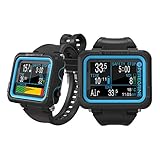
Overview: The Shearwater Peregrine targets recreational divers seeking premium build quality without technical diving complexity. This wrist-mounted computer emphasizes intuitive operation through its two-button stainless steel interface, delivering robust performance in a streamlined package designed for depths up to recreational limits.
What Makes It Stand Out: The state-aware menu structure automatically recognizes dive phases, reducing button presses when it matters most. Its 316 stainless steel buttons provide exceptional tactile feedback and corrosion resistance—features rarely seen at this price point. The included wireless USB charging station eliminates O-ring wear from traditional cable ports, enhancing long-term reliability.
Value for Money: At $575, the Peregrine sits in the mid-tier sweet spot. It lacks technical diving features like multigas or trimix, but delivers Shearwater’s renowned build quality and user experience for less than their technical models. Compared to entry-level computers, you’re paying for superior materials and interface design that justify the premium.
Strengths and Weaknesses: Strengths include exceptional battery life (30 hours), durable construction, and arguably the simplest menu system in diving. The wireless charging is genuinely innovative. Weaknesses are the absence of a digital compass, limited to single gas nitrox, and no Bluetooth connectivity for dive logging—requiring manual data transfer.
Bottom Line: Perfect for recreational divers who prioritize reliability and ease of use over advanced features. The Peregrine proves that simplicity and quality aren’t mutually exclusive, making it an excellent investment for serious weekend warriors.
2. Mares Puck Pro EZ Wrist Underwater Scuba Dive Computer (414177) - Depth, Decompression, Temperature, Time Dive Data Display

Overview: The Mares Puck Pro EZ serves as an entry-level gateway computer for new recreational divers or budget-conscious enthusiasts. Its single-button operation and high-contrast display strip away complexity, focusing on delivering essential dive data—depth, time, temperature, and decompression status—without overwhelming the user.
What Makes It Stand Out: Despite its affordable price, it runs the respected Buhlmann ZH-L16C algorithm with gradient factors, typically found in higher-end computers. The Bluetooth connectivity enables seamless dive log transfers to smartphones—a feature often missing in budget models. The replaceable battery supporting up to 100 dives keeps operational costs low.
Value for Money: At $199.95, this represents exceptional value. You’re getting a proven decompression algorithm, wireless connectivity, and nitrox compatibility (21-50%) for under $200. Comparable computers often cost $50-100 more while offering similar features, making the Puck Pro EZ a smart financial choice for beginners.
Strengths and Weaknesses: Strengths include the advanced algorithm, Bluetooth integration, excellent battery life, and crystal-clear display. The single-button interface, while simple, becomes tedious for navigating complex settings. It lacks a digital compass and has a basic LCD screen rather than color display. The plastic construction feels less premium than metal alternatives.
Bottom Line: An unbeatable entry point for new divers. The Puck Pro EZ proves that affordability doesn’t require sacrificing safety-critical algorithm quality, making it ideal for certification courses and early dive experiences.
3. SUUNTO Zoop Novo Wrist Scuba Diving Computer, Aqua Blue

Overview: The Suunto Zoop Novo occupies the trusted entry-mid range position that has made Suunto a household name in diving. This robust computer offers four operating modes—air, nitrox, gauge, and freedom—accommodating divers as they progress from beginner to intermediate levels while maintaining Suunto’s reputation for reliability.
What Makes It Stand Out: The backlit display ensures readability in challenging conditions, from murky water to night dives. Its programmable oxygen mixtures (21-50%) and decompression stop data provide flexibility for developing nitrox skills. The audible alarms add a crucial safety layer that many basic computers omit.
Value for Money: Priced at $279, the Zoop Novo delivers solid value through brand longevity and proven durability. While lacking modern connectivity features, it compensates with rock-solid performance and an interface that has trained thousands of divers. It’s $80 more than budget alternatives but offers Suunto’s ecosystem and resale value.
Strengths and Weaknesses: Strengths include multiple dive modes, excellent low-light visibility, intuitive menu system, and rugged construction. Weaknesses are the absence of Bluetooth connectivity, requiring a separate USB cable purchase for data transfer, and a somewhat bulky wrist profile. The display, while backlit, is basic compared to modern color screens.
Bottom Line: A dependable workhorse for recreational divers who value proven reliability over cutting-edge features. The Zoop Novo remains a training agency favorite for good reason—it’s simple, safe, and built to last.
4. Suunto Zoop Novo Wrist Scuba Diving Computer, Black, Without USB

Overview: This black variant of the Suunto Zoop Novo offers identical core functionality to its colorful counterpart—air, nitrox, gauge, and freedom modes with 21-50% oxygen programming. The omission of the USB cable represents a cost-saving measure that impacts post-dive data management but leaves underwater performance unchanged.
What Makes It Stand Out: The Zoop Novo’s enduring appeal lies in its straightforward operation and Suunto’s conservative algorithm philosophy, which many recreational divers prefer for added safety margins. The backlit display maintains excellent legibility, and the audible alarms provide clear warnings without requiring constant visual monitoring.
Value for Money: At $279, this version offers poorer value than the standard package. You’re paying the same price while missing the $30-40 USB download cable, forcing an additional purchase to access dive logging features. Savvy shoppers should verify whether the cable-inclusive version is available for the same price.
Strengths and Weaknesses: Strengths mirror the standard Zoop Novo: reliable performance, multiple modes, good low-light visibility, and rugged build quality. The critical weakness is the missing USB cable, making digital logbook access inconvenient and expensive. The black colorway offers a more professional aesthetic than brighter options.
Bottom Line: Only consider this variant if you genuinely don’t need digital dive logging. Otherwise, spend the few extra dollars for the USB-inclusive version. The computer itself remains excellent, but the stripped-down package diminishes its overall value proposition.
5. Mares Sirius Watch-Style Wrist Dive Computer for Recreational Divers | Underwater, Snorkeling/Scuba Diving Accessory, Black/Black

Overview: The Mares Sirius represents a significant leap into watch-style computers designed for ambitious recreational and technical divers. Its sophisticated ZH-L16C algorithm with predictive multigas capabilities supports up to five gas mixes including trimix, positioning it as a genuine crossover device for divers planning to advance beyond traditional recreational limits.
What Makes It Stand Out: The MIP color high-resolution display delivers exceptional clarity in all conditions, while the full-tilt digital compass with bearing memory provides genuine navigation capability. Hoseless tank integration supporting five transmitters enables complex sidemount or technical configurations rarely seen in wristwatch form factors.
Value for Money: At $659.95, the Sirius competes directly with entry-level technical computers while offering superior daily wearability. The feature set—color display, advanced algorithm, compass, and tank integration—typically costs $800+ in other brands. For divers progressing toward technical certification, it eliminates the need for a second computer purchase.
Strengths and Weaknesses: Strengths include the comprehensive algorithm, beautiful color display, robust compass, extensive gas management, and Bluetooth connectivity. The 30-hour battery life is competitive, and the underwater menu adds flexibility. Weaknesses are the steep learning curve for beginners and price point that exceeds pure recreational needs. The watch-style format may feel small for divers with poor eyesight.
Bottom Line: Ideal for recreational divers with technical ambitions or those wanting a true do-it-all computer. The Sirius justifies its premium price by combining daily wearability with serious dive capabilities that grow with your certification level.
6. Mares Puck Pro EZ Wrist Underwater Scuba Dive Computer (414177) - Depth, Decompression, Temperature, Time Dive Data Display

Overview: The Mares Puck Pro EZ is an entry-level wrist-mounted dive computer that delivers impressive functionality at an accessible price point. Designed for recreational divers, it tracks essential metrics including depth, decompression status, temperature, and bottom time. The device supports Nitrox mixtures from 21% to 50% and employs the reliable Buhlmann ZH-L16C algorithm with gradient factors.
What Makes It Stand Out: This computer distinguishes itself through Bluetooth connectivity—a rare feature in this price class—allowing seamless dive log transfers to smartphones. The single-button interface simplifies underwater navigation, while the high-contrast display ensures excellent readability. The replaceable battery supporting up to 100 dives minimizes maintenance costs and downtime.
Value for Money: At $199.95, the Puck Pro EZ punches above its weight class. Competing devices with Bluetooth typically cost $50-100 more. The inclusion of a sophisticated decompression algorithm and Nitrox compatibility makes it an exceptional value for budget-conscious divers who don’t want to compromise on safety features.
Strengths and Weaknesses: Strengths include intuitive single-button operation, excellent display visibility, reliable algorithm, and wireless connectivity. The replaceable battery is cost-effective long-term. Weaknesses involve the single-button system being somewhat slow for navigation, lack of air integration, and basic display compared to higher-end models. Some divers may find the menu system less refined than premium alternatives.
Bottom Line: The Mares Puck Pro EZ is an outstanding choice for new to intermediate recreational divers seeking modern connectivity without breaking the bank. It offers professional-grade safety features in a user-friendly package.
7. SUUNTO Zoop Novo Wrist Scuba Diving Computer, Wildberry

Overview: The Suunto Zoop Novo is a robust entry-level dive computer from one of the industry’s most trusted manufacturers. This wrist-mounted unit offers four operating modes: air, nitrox, gauge, and freedom, accommodating 21-50% oxygen mixtures. With a maximum depth rating of 330 feet and comprehensive decompression data, it serves recreational divers seeking reliable performance.
What Makes It Stand Out: Suunto’s reputation for reliability and accuracy sets this device apart. The backlit display ensures readability in low-light and night conditions, while programmable audible alarms provide crucial safety alerts. The freedom mode offers additional versatility for advanced recreational diving scenarios.
Value for Money: Priced at $299, the Zoop Novo sits in the sweet spot for entry-level computers from premium brands. While lacking Bluetooth connectivity, its build quality and algorithm reliability justify the cost. It competes directly with the Mares Puck series but trades wireless connectivity for Suunto’s established track record and customer support network.
Strengths and Weaknesses: Strengths include multiple dive modes, excellent backlighting, audible alarms, imperial/metric flexibility, and Suunto’s proven decompression algorithm. The rugged construction withstands heavy use. Weaknesses are the absence of Bluetooth log transfers, bulkier wrist profile compared to newer designs, and more complex menu navigation requiring multiple buttons. Battery replacement requires service center visits.
Bottom Line: The Suunto Zoop Novo is ideal for divers who prioritize brand reliability and proven performance over modern connectivity features. It’s a workhorse computer that will serve faithfully through years of diving adventures.
8. Mares Mission Puck 3 Scuba Diving Computer Console - Puck Computer w/Compact Easy-to-Read Pressure Gauge & Integrated Analog Compass

Overview: The Mares Mission Puck 3 combines a dive computer, pressure gauge, and analog compass in a single console unit. This integrated design provides all essential dive data in one convenient package. The single-button-operated Puck computer module offers air, nitrox, and bottom timer modes, while the ergonomic brass-bodied pressure gauge delivers tank pressure readings.
What Makes It Stand Out: The integrated analog compass is a standout feature, providing reliable navigation without electronic dependencies. The console’s ergonomic design with multiple attachment points allows customized positioning. The high-contrast screen with 170-degree viewing angle ensures readability in challenging conditions.
Value for Money: At $269.94, this console system offers excellent value compared to purchasing separate components. A standalone computer plus gauge and compass would typically exceed $350. The integrated design reduces hose clutter and provides streamlined access to critical information, justifying the mid-range price point.
Strengths and Weaknesses: Strengths include the all-in-one convenience, reliable analog compass backup, excellent display visibility, intuitive single-button operation, and durable construction. The compact pressure gauge is easy to read. Weaknesses involve console bulkiness compared to wrist computers, lack of air integration, and potential for hose entanglement. The analog compass requires proper tilt compensation technique.
Bottom Line: The Mission Puck 3 is perfect for divers who prefer console configuration and want integrated instrumentation without the premium cost of air integration. It offers exceptional convenience and reliability for recreational diving.
9. SCUBAPRO Luna 2.0 Air Integrated (AI) Wrist Scuba Dive Computer with Bluetooth®, Includes Case and Silicone Arm Strap

Overview: The SCUBAPRO Luna 2.0 AI represents a significant step up for divers wanting air integration in a wrist-mounted format. This computer wirelessly monitors tank pressure and calculates true remaining bottom time based on breathing workload. The wide high-contrast LCD display with LED backlight ensures excellent data visibility.
What Makes It Stand Out: Air integration via wireless transmitter provides real-time tank pressure and RBT calculations without hose clutter. Users can choose between two algorithms: Predictive Multi-Gas Buhlmann ZH-L16 ADT MB PMG or ZH-L16+GF. The slim, low-profile design with oil-fill technology creates a streamlined profile less prone to snagging.
Value for Money: At $499, the Luna 2.0 AI offers competitive pricing for an air-integrated computer from a premium brand. Comparable AI units from competitors typically start at $550-600. The inclusion of Bluetooth connectivity, dual algorithm choice, and SCUBAPRO’s reputation justify the investment for serious recreational divers.
Strengths and Weaknesses: Strengths include wireless air integration, accurate RBT calculations, slim profile, dual algorithm options, Bluetooth connectivity, and excellent display clarity. The two-button control is more efficient than single-button designs. Weaknesses include the additional cost of wireless transmitters (often sold separately), SCUBAPRO’s proprietary ecosystem, and a steeper learning curve for algorithm selection.
Bottom Line: The Luna 2.0 AI is an excellent choice for intermediate to advanced recreational divers ready to embrace air integration benefits. It combines sophisticated features with user-friendly operation in a sleek package.
10. OCEANIC Pro Plus 4.0 Dive Computer | Large Display, Easy to Read | Includes Compass | Connect to DiverLog+ App on Your Smartphone | Optional Quick Disconnect Attachment | Console NH

Overview: The OCEANIC Pro Plus 4.0 is a premium console dive computer designed for divers who demand maximum readability and advanced features. Its large display area with oversized fonts dramatically improves data legibility over previous generations. The unit includes an integrated compass and Bluetooth connectivity to the DiverLog+ app for comprehensive dive management.
What Makes It Stand Out: The exceptionally large, clear display sets this computer apart, reducing eye strain and improving situational awareness. Pre-dive planning via smartphone app allows setting dual Nitrox mixes and dual algorithms before entering the water. The optional quick-disconnect system provides flexibility to remove the computer without tools while keeping gauges attached.
Value for Money: At $789.95, the Pro Plus 4.0 commands a premium price but delivers corresponding features. While expensive compared to wrist computers, it’s competitively priced within the high-end console category. The large display, app integration, and Oceanic’s reputation for innovation justify the cost for divers prioritizing readability and convenience.
Strengths and Weaknesses: Strengths include the outstanding display size and clarity, comprehensive app connectivity, dual algorithm flexibility, integrated compass, and quick-disconnect option. The ability to adjust settings via smartphone is convenient. Weaknesses are the high price point, console format’s inherent bulk, and reliance on smartphone for advanced configuration. It’s overkill for casual divers.
Bottom Line: The Pro Plus 4.0 is best suited for serious recreational divers, especially those with vision considerations, who want top-tier console features and seamless digital integration. It’s a premium tool for the dedicated enthusiast.
Why Your Dive Computer Is Your Most Critical Piece of Gear
Your dive computer is the only piece of equipment that actively monitors your physiological status in real-time, making it fundamentally different from your regulator or BCD. While your regulator delivers life-supporting gas and your BCD controls buoyancy, your computer is continuously calculating your theoretical tissue loading, tracking your ascent rate, and predicting your decompression obligation based on your actual dive profile—not a pre-planned table you left on the boat.
In 2026, this distinction has become even more pronounced. Modern units integrate environmental sensors, personal biometric data (when paired with compatible heart rate monitors), and even water chemistry metrics to refine their calculations. They’ve essentially become your personal decompression safety officer, working 24/7 beneath the waves. Understanding this core purpose helps justify the investment and frames every feature decision around one principle: enhancing your safety while maximizing enjoyment.
Decompression Algorithms Demystified
At the heart of every dive computer lies a decompression algorithm—a mathematical model that simulates how inert gases dissolve into and release from your body’s tissues under pressure. The algorithm you choose fundamentally shapes your diving experience, influencing everything from your no-decompression limit (NDL) to your required safety stops.
The most common algorithms in 2026 remain variations of the Bühlmann ZH-L16 model, RGBM (Reduced Gradient Bubble Model), and VPM (Varying Permeability Model). Bühlmann-based algorithms are linear and predictable, making them popular for recreational diving. RGBM adds bubble mechanics theory, often resulting in more conservative deep dives and repetitive dive profiles. VPM treats bubbles as the primary concern from the start, typically generating the most conservative profiles of the three.
What matters for recreational divers isn’t necessarily which algorithm is “best,” but rather how transparent the manufacturer is about their implementation. Look for companies that publish their algorithmic modifications and allow user-adjustable conservatism settings. This transparency lets you understand why your computer is giving you specific limits, rather than blindly trusting a black box.
Conservative vs. Liberal: Finding Your Comfort Zone
Algorithm conservatism isn’t about bravery—it’s about matching the computer’s calculations to your personal physiology, age, fitness level, and risk tolerance. A 25-year-old triathlete might safely use a more liberal setting, while a 55-year-old diver with a higher body fat percentage should consider more conservative parameters.
In 2026, advanced computers offer granular control over conservatism, often expressed as gradient factors or personal factor settings. Some even incorporate AI-driven personalization that adjusts conservatism based on your dive history and surface interval patterns. For recreational diving, we recommend starting conservative and gradually adjusting as you log more dives and understand your body’s response to repetitive diving. Remember: a conservative computer might shave a few minutes off your bottom time, but it adds a significant margin of safety that costs you nothing but patience.
Air Integration: The Game-Changer for Situational Awareness
Wireless air integration has transitioned from a luxury feature to a must-have for serious recreational divers. By pairing a transmitter to your regulator’s first stage, your computer displays real-time tank pressure, calculates your exact surface air consumption (SAC) rate, and provides a dynamic “time remaining” display based on your current breathing rate and depth.
This transforms your dive planning from static calculations to fluid, real-time decision-making. Instead of estimating you have 45 minutes based on a 200-bar starting pressure, your computer tells you precisely that at your current depth and breathing rate, you have 38 minutes before reaching your reserve pressure. As you ascend and your breathing slows, that number automatically adjusts upward.
For recreational divers, this means safer dives with better gas management and fewer surprises. It also eliminates the need for a separate SPG, streamlining your console and reducing potential failure points. The psychological benefit is equally valuable—seeing your exact gas status reduces anxiety and allows you to focus on the dive experience itself.
Transmitter Technology and Signal Reliability
Modern transmitters in 2026 operate on robust frequencies (typically 2.4 GHz or proprietary protocols) with encryption to prevent cross-pairing with other divers’ computers. Signal reliability has improved dramatically, with most units maintaining connection even in overhead environments like wrecks or swim-throughs where earlier generations would drop out.
Key considerations include transmitter battery life (typically 100-300 hours of dive time), ease of battery replacement, and whether the transmitter supports multiple tank pressure readings for sidemount or technical configurations. Some advanced systems now include vibration alerts in the transmitter itself, providing a tactile warning if you miss the computer’s visual display. For travel, look for transmitters with automatic airline travel mode that prevents accidental activation during flights.
Display Technology: Clarity When You Need It Most
The display is your underwater information portal, and 2026 has brought remarkable advances in readability. We’ve moved beyond basic LCDs to high-contrast micro-OLED and transflective memory-in-pixel (MIP) displays that remain visible in direct tropical sunlight and pitch-black night dives.
Color screens, once a battery-draining gimmick, now use intelligent power management to display critical information in high-contrast color codes—red for warnings, green for safe zones, blue for neutral data. This color psychology helps you process information faster underwater, where cognitive function can be impaired by narcosis or task loading.
Resolution matters less than contrast ratio and viewing angle. A display with 300:1 contrast that you can read at 45 degrees without moving your arm is infinitely more valuable than a 4K screen that washes out in ambient light. Pay attention to font size and customizability—being able to enlarge your depth or NDL display can reduce stress during critical moments.
Adaptive Brightness and Night Diving Modes
The best 2026 computers feature ambient light sensors that automatically adjust display brightness, preventing the blinding effect of a bright screen during a night dive while ensuring readability in bright shallows. Night mode takes this further by shifting to red-only illumination, preserving your natural night vision while still displaying all critical data.
Some models now offer “focus modes” that dim all but the most critical information during ascents or decompression stops, reducing distractions when your attention needs to be sharpest. For photographers, a “stealth mode” that minimizes light output while still recording dive data is invaluable for not spooking marine life during that perfect shot.
Battery Life and Power Management in 2026
Battery anxiety has plagued divers since the first digital computers, but 2026’s models have largely solved this through three innovations: low-power processors, solar-assisted charging, and intelligent sleep modes. A modern recreational computer should easily handle 30-40 hours of active dive time on a single charge or battery replacement.
Lithium-ion rechargeable batteries dominate the premium segment, offering consistent voltage output that prevents the dim displays and sluggish performance of alkaline batteries as they drain. Solar-assisted models extend this further, trickle-charging from ambient light between dives—perfect for liveaboard trips where charging opportunities are limited.
For traditionalists, user-replaceable battery systems remain available, but ensure the manufacturer uses a robust o-ring system and provides clear replacement instructions. A leaky battery compartment has ended more dive trips than any equipment failure.
User-Replaceable vs. Sealed Systems
The debate between user-replaceable and factory-sealed batteries reflects a trade-off between convenience and waterproofing integrity. User-replaceable systems let you swap batteries anywhere, but each opening introduces a potential failure point. Sealed systems require factory service but maintain their waterproof integrity for the computer’s lifespan.
In 2026, sealed systems have gained popularity as battery life has extended to 5-7 years of typical recreational use. Many manufacturers now offer expedited battery replacement services with pressure testing, often completed within a week. For divers who log 50+ dives annually, the peace of mind of a sealed system often outweighs the convenience of field replacement.
Connectivity and Data Syncing: The Digital Dive Log Revolution
The modern dive computer is a data collection hub that automatically syncs with your smartphone, tablet, or cloud service immediately post-dive. Bluetooth 5.3 and WiFi 6 have made transfers nearly instantaneous, uploading full dive profiles, temperature gradients, and even GPS surface coordinates to platforms like Subsurface, Dive Log Manager, or proprietary apps.
This connectivity transforms your dive log from a manual chore into a rich, interactive experience. AI-powered log analysis can identify patterns in your air consumption, highlight concerning ascent rates across multiple dives, and even suggest optimal surface intervals based on your personal decompression stress history. Some systems now integrate with fitness trackers, correlating your surface heart rate variability with post-dive fatigue levels.
For travel, cloud syncing means your dive data is protected even if your computer is lost or damaged. Many 2026 models also support over-the-air firmware updates, ensuring your device improves over time with new features and algorithm refinements—effectively future-proofing your investment.
Nitrox, Trimix, and Gas Switching Capabilities
While recreational diving traditionally focuses on air and Nitrox, 2026’s computers increasingly support multi-gas configurations that future-proof your purchase as you advance. At minimum, any quality recreational computer should support Nitrox blends from 21% to 40% oxygen with automatic oxygen toxicity tracking (CNS% and OTU).
More advanced recreational models now offer gas switching for up to three mixes, allowing you to carry a higher-oxygen deco gas for safety stops or use a travel gas for deeper wrecks before switching to Nitrox for the majority of your dive. Even if you don’t plan technical training, this flexibility proves valuable for specialized recreational courses like deep diving or wreck penetration.
The key feature to evaluate is how intuitive the gas switch interface is. Can you switch gases with two button presses while maintaining neutral buoyancy? Does the computer clearly display which gas is active? Confusing gas switches have caused accidents; simplicity saves lives.
The Rise of AI-Powered Dive Planning
Artificial intelligence has graduated from buzzword to practical tool in 2026’s dive computers. Rather than simply following static algorithms, AI-enhanced models analyze your personal dive history to predict your actual gas consumption, decompression stress patterns, and even susceptibility to seasickness based on surface interval conditions.
These systems use machine learning to refine their calculations, recognizing that Diver A and Diver B might have dramatically different responses to identical dive profiles. Your computer might suggest a longer surface interval after noticing your heart rate variability indicates higher stress on repetitive dives, or recommend a more conservative profile when diving in cold water after analyzing your previous cold-water SAC rates.
For recreational divers, this means your computer becomes more accurate the more you dive with it. The AI also assists with pre-dive planning, suggesting optimal profiles based on current conditions, your recent dive history, and even the specific marine life you hope to encounter (accounting for expected depth and bottom time).
Compass and Navigation Features
The integrated digital compass has become standard in 2026, but quality varies dramatically. A good digital compass should be tilt-compensated (accurate up to 45 degrees off-level), auto-calibrating, and display a full 360-degree bearing with a clear lubber line for navigation.
Advanced models overlay the compass on your primary dive screen, showing bearing and distance-to-boat simultaneously with depth and NDL. Some now include basic mapping that records your underwater track, allowing you to retrace your path to the anchor line or swim directly to a specific reef feature on subsequent dives.
For navigation-focused divers, look for computers that allow you to set multiple bearing waypoints pre-dive. The interface should let you switch between compass and standard dive screens without fumbling through menus. Remember: a compass you can’t access instantly is a compass you won’t use.
Customizable Alerts and Safety Settings
The ability to tailor alerts to your preferences separates good computers from great ones in 2026. Beyond standard depth and time alarms, modern units offer customizable ascent rate warnings (critical for preventing lung overexpansion injuries), NDL notifications at user-defined intervals, and even reminders to check your buddy or perform a safety stop.
Progressive alert systems are particularly valuable—instead of a single alarm at 100 bar, you might get a gentle vibration at 120 bar, a yellow warning at 100 bar, and a red alert with haptic feedback at 80 bar. This graduated approach prevents alarm fatigue while ensuring critical warnings aren’t missed.
For repetitive diving, look for computers that alert you to minimum surface interval requirements and display your estimated tissue saturation status. Some models now include hydration reminders based on dive duration and water temperature—a small feature that significantly impacts post-dive fatigue and DCS risk.
Watch-Style vs. Console-Mounted: Form Factor Considerations
The form factor debate extends beyond aesthetics to practical functionality. Watch-style computers dominate the market for good reason: they’re travel-friendly, double as daily wearables (tracking steps, sleep, and even stress levels), and keep your instrument configuration minimalist.
Console-mounted systems, while less common, offer larger displays and integrate directly with your SPG and compass in a single unit. This reduces wrist clutter and ensures all critical information is in one location—a significant advantage for divers who find wrist-worn devices cumbersome or who wear thick gloves that impede button operation.
Hybrid models have emerged in 2026, featuring detachable watch units that can mount in a console for diving but be worn separately for travel or daily use. Consider your typical diving environment: tropical destinations favor watch styles, while cold-water diving in thick drysuit gloves might make a console’s larger buttons and screen more practical.
Durability and Water Resistance Ratings Explained
That “200m water resistance” rating on your computer doesn’t mean what you think it means. Water resistance ratings are tested in static pressure conditions—essentially a lab test where the device sits motionless at depth. Real diving involves dynamic pressure from movement, temperature shocks, and aging o-rings.
For recreational diving, look for computers rated to at least 100m (330ft) with an IPX8 or higher ingress protection rating. IPX8 means the device has been tested for continuous immersion, while the depth rating indicates the maximum static pressure it survived. The sweet spot for recreational divers is 150m rating with IPX8—this provides a safety margin far beyond recreational limits while ensuring the seals are robust.
Construction materials matter equally. Fiber-reinforced polymer cases offer excellent strength-to-weight ratios and resist corrosion better than aluminum. Sapphire crystal displays are nearly scratch-proof compared to mineral glass or plastic lenses. For the strap, consider silicone for comfort and durability, or titanium if you have latex allergies or dive in highly corrosive environments.
Price Tiers and What You Get at Each Level
Dive computers in 2026 cluster into three distinct price tiers, each offering specific value propositions. Understanding these helps you avoid paying for features you’ll never use or undershooting your needs.
Budget Tier ($250-$450): These computers handle air and Nitrox, offer basic ascent rate monitoring, and include digital compasses. Displays are typically high-contrast monochrome or simple color LCDs. Battery life is excellent, and durability is solid, but you won’t find air integration or AI features. Perfect for entry-level divers or as reliable backup computers.
Mid-Range ($450-$750): This is the recreational diver’s sweet spot. You’ll get wireless air integration, multi-gas support (typically 3 mixes), advanced OLED displays, and basic connectivity features. AI-powered log analysis and customizable conservatism settings appear here. Most recreational divers will find everything they need in this tier without unnecessary complexity.
Premium Tier ($750+): Premium models offer everything in the mid-range plus advanced AI coaching, solar charging, titanium construction, sidemount-specific algorithms, and technical diving capabilities that exceed recreational needs. You’re paying for build quality, future-proofing, and features that shine on 100+ dive annual schedules or technical progression paths.
Firmware Updates and Long-Term Support
A dive computer is a long-term investment, and manufacturer support can make or break its lifespan. In 2026, leading brands commit to at least 5 years of firmware updates, adding features and algorithm refinements long after purchase. This support transforms your computer from a static device into an evolving tool.
Before purchasing, research the manufacturer’s update history. Do they actively fix bugs? Do they respond to user feedback with meaningful feature additions? Check user forums for complaints about abandoned products—nothing is more frustrating than a computer that can’t sync with the latest smartphone OS because the manufacturer stopped updating the app.
Some companies now offer “feature subscriptions” that unlock advanced capabilities for a monthly fee. While controversial, this model can fund ongoing development. Evaluate whether these subscription features align with your diving—most recreational divers find the base functionality sufficient without ongoing costs.
Environmental Considerations and Sustainable Manufacturing
Sustainability has become a legitimate purchasing factor in 2026. Leading manufacturers now use recycled ocean plastics in casings, solar power to reduce battery waste, and modular designs that allow component replacement rather than full unit disposal. Some even offer trade-in programs that recycle old computers responsibly.
Consider the computer’s repairability index—can the strap be replaced without tools? Is the battery serviceable? Does the manufacturer publish repair manuals? A computer that lasts 10 years with minor repairs has a far smaller environmental footprint than replacing a sealed unit every 3 years.
Packaging has also evolved. Look for brands using minimal, recyclable packaging and carbon-neutral shipping. While these factors shouldn’t override safety features, they allow you to align your gear choices with ocean conservation values—a meaningful consideration for divers who witness marine degradation firsthand.
Frequently Asked Questions
Do I really need air integration as a recreational diver?
Air integration isn’t mandatory, but it fundamentally improves situational awareness and gas management. For divers doing repetitive dives, deep dives (30m+), or diving in challenging conditions, the real-time SAC rate and dynamic time-remaining display are invaluable safety enhancements. Entry-level divers can certainly start without it, but most progress to air integration within their first year of active diving.
How long should a dive computer battery last in 2026?
A quality computer should deliver 30-50 hours of active dive time. Rechargeable lithium-ion models typically last 3-7 years before capacity degradation requires replacement, while user-replaceable battery systems should be swapped annually as preventive maintenance. Solar-assisted models can extend this significantly, often lasting a full liveaboard trip without needing a charge.
What’s the difference between a dive computer and a dive watch?
A dive watch simply tells time and includes a rotating bezel for tracking elapsed dive time—a passive tool requiring you to remember your limits. A dive computer actively calculates your decompression status, monitors ascent rate, tracks tissue loading, and provides real-time safety feedback. Dive watches are backup devices; computers are primary life-support equipment.
Can I use my dive computer for freediving?
Most modern computers include a freedive mode that tracks depth, time, and surface intervals with algorithms optimized for the rapid pressure changes of breath-hold diving. However, dedicated freediving computers offer specialized features like surface interval alarms, training tables, and faster sampling rates. If you freedive occasionally, your scuba computer’s mode is sufficient; if you’re a serious freediver, consider a dedicated unit.
How often should I update my dive computer firmware?
Check for updates quarterly and install them at least annually. Critical safety updates are rare but essential when released. Always update before a major dive trip, never between dives on the same day. Read update notes to understand what’s changing—some updates modify algorithms, which might affect your dive planning if you’re accustomed to previous behavior.
Is a color screen worth the extra cost for recreational diving?
Color screens excel at information hierarchy—critical warnings pop in red, safe conditions in green, neutral data in blue. This speeds up comprehension underwater, especially for newer divers. However, monochrome displays with high contrast are equally readable and often offer better battery life. If you’re budget-conscious, prioritize contrast and font size over color; if you want the best user experience, color is a worthwhile upgrade.
What algorithm setting is best for beginner divers?
Start with a conservative setting (higher personal factor or lower gradient factor). This builds in a safety margin while you’re still learning proper buoyancy and ascent control. As you gain experience and understand your personal physiology, you can gradually adjust to standard or liberal settings. Many instructors recommend staying conservative until you’ve logged at least 50 dives in varied conditions.
Can I travel with my dive computer’s transmitter?
Yes, but remove it from your regulator and pack it in carry-on luggage. The transmitter is a pressure vessel and could be damaged in checked baggage. Most modern transmitters have travel mode that prevents accidental activation, but removing the battery is the surest way to prevent it from transmitting during flight. Always carry a spare o-ring and installation tool in your save-a-dive kit.
What happens if my computer fails mid-dive?
This is why redundancy is taught in all certification courses. If your primary computer fails, immediately signal your buddy and begin a controlled ascent using their computer as a reference for ascent rate and safety stops. You should also carry a backup timing device and depth gauge (or second computer) for exactly this scenario. Never continue a dive after a computer failure—ascend safely and end the dive.
Are budget dive computers safe for recreational use?
Absolutely. All dive computers sold by reputable manufacturers must meet rigorous EN standards for decompression calculation accuracy. Budget models use the same core algorithms as premium units; they simply lack advanced features like air integration, color displays, and connectivity. A $300 computer from a major brand will keep you just as safe as a $900 model—the difference is convenience and information richness, not fundamental safety.