There’s a special kind of anxiety that hits when you’re deep in the backcountry, your phone displays “No Signal,” and the trail intersection ahead looks nothing like you remember. In that moment, your connection to the digital world becomes a liability rather than a lifeline. But here’s the paradox: the same technology that makes us dependent on cell towers has also evolved to set us free from them. Modern smartwatches with offline topographic mapping have transformed from simple fitness trackers into sophisticated navigation tools that live on your wrist, accessible with a glance, and completely independent of cellular networks.
This isn’t just about having a backup plan—it’s about fundamentally changing how you interact with the wilderness. When your navigation tool doesn’t require a data connection, you’re no longer tethered to infrastructure. You can explore obscure trails, venture into designated wilderness areas where cell towers don’t exist, and navigate with the confidence that comes from self-reliance. Whether you’re a day hiker, ultra-runner, mountaineer, or multi-day backpacker, understanding how to leverage smartwatch topo maps without cell signal opens up a world of possibilities while adding a critical layer of safety to your adventures.
Top 10 Smartwatches with Topo Maps
Detailed Product Reviews
1. Garmin fēnix 5 Plus, Premium Multisport GPS Smartwatch, features Color Topo Maps, Heart Rate Monitoring, Music and Pay, Black/Silver (Renewed)
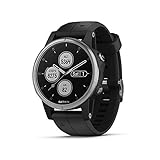
Overview: The renewed Garmin fēnix 5 Plus delivers premium multisport GPS capabilities at a fraction of the original cost. This rugged smartwatch combines advanced navigation with everyday convenience features, making it ideal for serious athletes and outdoor enthusiasts who want proven Garmin reliability without paying full retail.
What Makes It Stand Out: Garmin’s legendary navigation prowess shines with color TOPO maps featuring Trendline popularity routing, helping you discover optimal trails. The stainless steel bezel and reinforced construction meet military standards for thermal, shock, and water resistance. Wrist-based heart rate monitoring, 500-song music storage, and Garmin Pay contactless payments create a comprehensive adventure companion that functions independently of your phone.
Value for Money: At $199.99 renewed, you’re getting a $600+ watch for one-third the price. Garmin’s build quality ensures longevity, and the renewed status typically includes functional inspection with warranty coverage. Compared to budget GPS watches, the fēnix 5 Plus offers superior sensor accuracy, map detail, and ecosystem integration that justifies the premium.
Strengths and Weaknesses: Pros include industry-leading GPS accuracy, durable construction, extensive third-party app support through Connect IQ, and reliable heart rate monitoring. Cons encompass the renewed condition potential for cosmetic wear, outdated 240x240 display resolution by modern standards, unspecified battery life in this listing, and lack of newer Garmin features like PacePro.
Bottom Line: For dedicated runners, hikers, and triathletes seeking a professional-grade training tool, this renewed fēnix 5 Plus represents exceptional value. The proven Garmin ecosystem and robust construction outweigh the minor compromises of buying renewed.
2. Smart Watch for Men Built-in GPS with Map(Answer/Make Call/Text), 1.46" AI Smartwatch for Android Phones/iPhone, 100+ Sport Mode Fitness Tracker with Health/Sleep Monitor, Compass/Barometer(2 Straps)

Overview: This feature-rich smartwatch punches far above its $52.99 price point, delivering GPS navigation, Bluetooth calling, and comprehensive health tracking typically found in devices costing four times as much. It’s designed for budget-conscious users who refuse to compromise on core smartwatch functionality.
What Makes It Stand Out: Built-in GPS with offline map support across five satellite systems ensures reliable navigation even without cellular service. The Bluetooth calling and text functionality with voice-to-text replies keeps you connected on the go. AI-powered features generate custom watch faces and provide translation services, while 100+ sport modes and 5ATM water resistance cover virtually any activity.
Value for Money: This watch redefines budget expectations. At under $53, it rivals $200+ competitors from established brands, offering comparable GPS accuracy, health sensors, and smart features. The inclusion of two straps and a large 550mAh battery further sweetens the deal, making it arguably the best value proposition in the entry-level market.
Strengths and Weaknesses: Pros include unbeatable price, comprehensive feature set, offline maps, AI integration, and impressive battery capacity. Cons involve an unknown brand with unproven long-term support, Android-only text reply limitations, potentially inflated AI claims, and build quality that may not match premium alternatives.
Bottom Line: Perfect for first-time smartwatch buyers, casual fitness enthusiasts, or anyone needing a capable backup device. While it lacks the refinement of major brands, the feature-to-price ratio is simply unmatched.
3. 2026 AI Smart Watch with Standalone GPS & Offline Maps, 5ATM Waterproof, 1.43" AMOLED, 21-Day Battery, 178 Sports Modes, Compass, Heart Rate/SpO2/Stress/Sleep Monitor, for Android iOS Men Women Black

Overview: The ambitiously-named 2026 AI Smart Watch positions itself as a tech-forward multisport wearable with premium specifications. At $123.99, it bridges the gap between budget trackers and high-end Garmin/Apple alternatives, targeting users who want cutting-edge features without flagship prices.
What Makes It Stand Out: The 1.43-inch AMOLED display with 1000-nit brightness and 466x466 resolution rivals premium watches. A claimed 21-day battery life addresses a common smartwatch pain point. The AI ecosystem is genuinely extensive: voice-generated fitness plans, 20 virtual companions (from trainers to counselors), real-time translation in 24 languages, and AI-generated watch faces. Bluetooth 5.4 with dual-microphone noise cancellation enhances call clarity.
Value for Money: This watch offers flagship-grade display technology and an unmatched AI feature set at mid-range pricing. Comparable AMOLED GPS watches from Samsung or Garmin cost $300-500. If the battery and performance claims hold true, it represents remarkable value for tech-savvy users.
Strengths and Weaknesses: Pros include the stunning AMOLED screen, extensive AI functionality, 178 sport modes, 5ATM water resistance, and advanced calling features. Cons center on the unknown brand, potentially gimmicky AI implementations, questionable “2026” branding, and unproven durability in real-world testing.
Bottom Line: Ideal for early adopters and tech enthusiasts who prioritize display quality and AI assistance over brand reputation. It’s a feature powerhouse that demands consideration, provided you accept the risks of buying from an emerging manufacturer.
4. Garmin Fenix 5 Plus Premium Multisport GPS Smartwatch with Color TOPO Maps, Heart Rate Monitoring, Music and Garmin Pay with Black Band (Renewed)

Overview: This renewed Garmin Fenix 5 Plus offers the same premium multisport DNA as Product 1, with the added clarity of detailed battery specifications. It’s a professional-grade adventure watch that provides Garmin’s renowned navigation and training tools at a substantial discount from original retail pricing.
What Makes It Stand Out: Garmin’s color TOPO maps with Trendline routing leverage millions of user data points to identify optimal trails. The rugged construction features stainless steel or DLC titanium components tested to military standards. Comprehensive navigation sensors include a 3-axis compass, gyroscope, and barometric altimeter working across GPS, GLONASS, and Galileo satellite networks for superior tracking in dense forests or urban canyons.
Value for Money: At $229.98, it’s slightly pricier than Product 1 but still offers 60-70% savings versus new. The explicit battery life ratings (12 days smartwatch, 18 hours GPS, 8 hours GPS+music) provide confidence for ultramarathoners and backpackers planning long excursions. Garmin’s ecosystem and build quality justify the premium over no-name alternatives.
Strengths and Weaknesses: Pros feature exceptional battery management, proven durability, accurate multi-system GPS, extensive Connect IQ app marketplace, and reliable performance metrics. Cons include the renewed condition, 2018-era 240x240 display, lack of modern training features like animated workouts, and no solar charging option available in newer models.
Bottom Line: A top-tier choice for serious adventurers who need trusted reliability and comprehensive battery data. The slight price increase over Product 1 is offset by transparent specifications and Garmin’s unparalleled outdoor pedigree.
5. Smart Watches for Men,1.46" Fitness Tracker (Make Calls/Text),GPS and Offline Maps Navigation,5 Satellite Systems,Health,Compass/Altitude/Barometer,100+Sports Mode for Android iOS with 2 Straps

Overview: At just $40.99, this military-styled smartwatch demolishes price barriers while delivering GPS navigation, Bluetooth calling, and comprehensive health tracking. It’s engineered for buyers who need maximum functionality on minimal budgets, proving that entry-level pricing doesn’t require entry-level features.
What Makes It Stand Out: The watch offers built-in GPS with offline map support across five satellite systems—a feature rarely seen below $100. Bluetooth 5.4 provides stable connectivity for hands-free calls and notifications. The dual-strap package (leather and silicone) adds versatility, while 100+ sport modes and 5ATM water resistance ensure comprehensive activity coverage. The military-inspired design emphasizes durability despite the low price.
Value for Money: This represents the absolute floor for GPS-enabled smartwatches with calling capabilities. Comparable devices from recognizable brands start at $150+. While corners are inevitably cut, the core feature set is remarkably complete, making it a perfect starter watch or backup for harsh environments where you wouldn’t risk an expensive device.
Strengths and Weaknesses: Pros include the incredible price, GPS with offline maps, Bluetooth 5.4, dual straps, and extensive feature list. Cons involve questionable long-term reliability, unknown sensor accuracy, limited customer support, basic build quality, and Android-only text replies. The brand lacks Garmin’s proven track record.
Bottom Line: Best suited for budget-conscious beginners, kids, or as a beater watch for dangerous activities. Don’t expect perfection, but the value proposition is undeniable for those prioritizing features over brand assurance.
6. Smart Watch with Built-in GPS and Offline Maps, 1.96" HD Display, Answer/Make Calls, 100+ Sport Modes, Heart Rate/Sleep/SpO2 Monitor, Fitness Activity Tracker for Android and iPhone, 2 Bands, Black

###6. Smart Watch with Built-in GPS and Offline Maps, 1.96" HD Display, Answer/Make Calls, 100+ Sport Modes, Heart Rate/Sleep/SpO2 Monitor, Fitness Activity Tracker for Android and iPhone, 2 Bands, Black
Overview: This $59.99 GPS smartwatch delivers offline mapping and comprehensive health tracking at a fraction of premium brand prices. Designed for both men and women, it features a 1.96-inch HD display and includes two interchangeable bands for versatile styling.
What Makes It Stand Out: The offline map functionality with multi-satellite GPS positioning sets it apart in the budget category, allowing true off-grid navigation. Unique AI features enable voice-described watch faces and photo customization, while the PAI health score synthesizes complex wellness data into actionable insights. Android users benefit from voice-to-text SMS replies.
Value for Money: At under $60, this watch offers features typically found in $200+ devices. The inclusion of two bands, 100+ sport modes, and environmental sensors (compass, altimeter, barometer) represents exceptional value. While build quality may not match premium brands, the feature-to-price ratio is outstanding for casual adventurers.
Strengths and Weaknesses: Strengths include genuine offline maps, multi-system GPS, comprehensive health monitoring (SpO2, heart rate, sleep, stress), and AI customization. Weaknesses involve an unknown brand reputation potentially affecting long-term support, likely shorter battery life than premium alternatives, and iOS limitations on SMS features. Sensor accuracy may not match Garmin or Suunto standards.
Bottom Line: Perfect for budget-conscious outdoor enthusiasts who need offline navigation without breaking the bank. Compromise on brand prestige but gain impressive functionality. Ideal for weekend hikers and fitness trackers rather than serious mountaineers.
7. Military GPS Smart Watch for Men with Offline Map/Air Pressure/Altitude/Compass,smart Watch for Android Phones and iPhone,Waterproof Fitness Tracker with Blood Oxygen/Heart Rate/Sleep/100+ Sport Modes

Overview: This military-inspired GPS smartwatch at $49.99 targets outdoor adventurers seeking reliable navigation without premium costs. Compatible with Android and iOS, it combines positioning sensors with health monitoring in a rugged package built for challenging environments.
What Makes It Stand Out: The quad-satellite GPS system (GPS, BeiDou, Galileo, GLONASS) delivers robust positioning in challenging environments. Dedicated environmental sensors—compass, altimeter, and barometer—provide crucial backcountry data. Offline map access with turn-by-turn directions works entirely without cellular service, a critical safety feature for remote exploration.
Value for Money: Positioned $10 below similar models, this watch eliminates AI customization but maintains core navigation and health features. The military aesthetic appeals to tactical users, while waterproof construction adds durability. For pure navigation functionality, it arguably offers better value than pricier alternatives.
Strengths and Weaknesses: Strengths include rapid satellite acquisition (8-40 seconds), comprehensive sensor array, offline navigation, and multi-platform compatibility. Weaknesses likely include a basic display resolution, unmentioned battery life concerns, and absence of music storage or contactless payment. The “military” branding may oversell actual durability standards.
Bottom Line: An excellent entry-level choice for hikers and campers prioritizing navigation over smart features. Delivers essential outdoor tools at an unbeatable price point. Serious athletes should consider higher-end options, but casual users get tremendous bang for their buck.
8. Military Smart Watch with GPS and Map(Answer/Make Call), Smartwatches with Health Monitor, Compass/Altitude/Air Pressure,100+ Sport Modes, Fitness Tracker for Android/iPhone (with GPS+Map, Gray)

Overview: At just $33.24, this military-grade smartwatch claims premium features for budget prices. Designed for extreme conditions, it promises GPS navigation, health tracking, and smartphone connectivity in a ruggedized gray package that belies its cost.
What Makes It Stand Out: The price point is revolutionary—no other GPS-enabled watch with offline maps approaches this cost. Military-grade durability claims suggest resistance to water, dust, and temperature extremes. The comprehensive feature set including 100+ sport modes, environmental sensors, and call functionality defies conventional pricing logic entirely.
Value for Money: This represents the absolute lowest entry point for GPS smartwatch technology. For the cost of a basic fitness band, users receive mapping capabilities and advanced sensors. However, extreme pricing raises questions about component quality, sensor accuracy, and long-term reliability. It’s a high-risk, high-reward proposition for adventurous buyers.
Strengths and Weaknesses: Strengths are undeniable: unbeatable price, claimed military durability, full feature parity with expensive models, and weather forecasting. Weaknesses include questionable brand credibility, likely inferior display quality, potentially inaccurate sensors, and probable software support issues. Battery life remains unspecified—a significant red flag for outdoor use.
Bottom Line: Buy this only if you’re willing to gamble on unknown brand performance. It’s perfect for kids, backup use, or those wanting to experiment with smartwatch features without financial commitment. Serious adventurers should invest more for reliability and accuracy.
9. Garmin fenix 5 Plus, Premium Multisport GPS Smartwatch, Features Color Topo Maps, Heart Rate Monitoring, Music and Contactless Payment, Black with Black Band

Overview: The Garmin fenix 5 Plus represents the premium tier at $399, offering multisport GPS capabilities in a rugged, adventure-ready design. This established model combines mapping, music, and contactless payment with Garmin’s renowned ecosystem and build quality.
What Makes It Stand Out: Color TOPO maps with TrendLine routing leverage Garmin’s extensive activity database to suggest optimal trails. The ability to store 500 songs enables phone-free workouts, while Garmin Pay adds convenience. Premium materials including stainless steel and DLC titanium bezels ensure durability, and the 3-axis compass with gyroscope provides superior navigation accuracy.
Value for Money: While expensive, the fenix 5 Plus delivers professional-grade reliability and accuracy that budget alternatives cannot match. However, it’s a previous-generation model, lacking newer features like solar charging and advanced health metrics. At $399, it competes with newer mid-range watches, making it best for Garmin loyalists seeking proven performance.
Strengths and Weaknesses: Strengths include exceptional build quality, accurate sensors, robust app ecosystem, offline music, and trusted brand support. Weaknesses involve dated technology, no SpO2 sensor (on this model), shorter battery life than newer competitors, and premium pricing for older hardware.
Bottom Line: Ideal for serious athletes and adventurers who prioritize accuracy and reliability over cutting-edge features. While superseded by newer models, it remains a capable premium option. Budget-conscious buyers should look elsewhere, but Garmin enthusiasts will appreciate its proven track record.
10. Cubitt AURA Pro 2 Smartwatch with Built-In GPS, Offline Maps, 1.48” AMOLED HD, VITA AI, AI Coach, Readiness Score, Health Snap, Sleep Score, 5ATM, 10-Day Battery – Wolf Gray
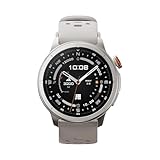
Overview: The Cubitt AURA Pro 2 positions itself as a mid-range powerhouse at $119.95, bridging budget and premium categories. It combines AMOLED display technology with advanced health analytics and impressive 10-day battery life in an attractive wolf gray design.
What Makes It Stand Out: The 1.48-inch AMOLED screen delivers superior clarity and color compared to LCD competitors. VITA AI provides personalized coaching, while the Readiness Score and 90-second Health Snap offer quick wellness assessments. Support for five GNSS systems ensures accurate tracking, and the 5ATM rating guarantees water resistance for serious water activities.
Value for Money: This watch punches above its weight with features like VO2 Max tracking, body temperature monitoring, and menstrual cycle tracking—metrics often reserved for premium devices. The 10-day battery life addresses a major smartwatch pain point. It competes directly with $200-$300 offerings from established brands.
Strengths and Weaknesses: Strengths include the vibrant AMOLED display, comprehensive health suite, AI coaching, exceptional battery life, and offline music support. Weaknesses involve a smaller screen than some competitors, lesser-known brand reputation, and potentially less refined software than Garmin or Coros. Long-term durability remains unproven.
Bottom Line: The best value for users wanting premium health features without premium cost. Perfect for health-focused individuals who prioritize display quality and battery life. Outdoor enthusiasts get solid navigation, while the AI features appeal to tech-savvy users. A compelling alternative to big-brand mid-range watches.
Why Offline Navigation Matters for Trail Enthusiasts
The romance of disconnecting from civilization quickly fades when you’re uncertain of your location. Wilderness areas, by definition, lack the infrastructure we’ve grown dependent on. Even popular national parks have vast dead zones where cell signals simply cannot reach. This isn’t a bug—it’s a feature of protected lands. Offline navigation transforms your smartwatch from a connected accessory into a standalone tool that respects these boundaries.
Beyond the practical necessity, there’s a psychological component. When you know your navigation system works independently of external factors, you make different decisions. You might take that intriguing side trail, attempt a more ambitious loop, or feel confident traveling solo. This freedom comes with responsibility, of course, but it’s rooted in the reliability of tools that function anywhere on the planet, regardless of cell tower placement.
How Smartwatch GPS Works Without Cell Service
The fundamental principle that makes offline navigation possible is understanding that GPS and cellular connectivity are entirely separate technologies. Your smartwatch receives signals from a constellation of satellites orbiting Earth, broadcasting precise timing and location data. These signals are one-way transmissions—satellites don’t know or care whether your device has cell service.
Assisted GPS vs. Standalone GPS
Most modern devices use Assisted GPS (A-GPS) to speed up initial location fixes when connected to cellular or Wi-Fi. This downloads satellite ephemeris data, reducing the time from 30-60 seconds to just a few seconds. However, premium navigation smartwatches store this data locally and can calculate your position using only satellite signals. The initial fix might take longer—sometimes up to two minutes in challenging conditions—but once established, tracking continues uninterrupted.
The key is that satellite signals are incredibly weak by the time they reach your wrist. Your watch needs a clear view of the sky and sufficient processing power to decode these signals against background noise. This is why chipset quality matters more than marketing claims when evaluating true offline capability.
Understanding Topo Maps: The Basics
Topographic maps are fundamentally different from the road maps we use daily. They represent three-dimensional terrain on a two-dimensional surface through contour lines, elevation data, and symbolic representations of natural and man-made features. For trail navigation, this visual language is critical.
Raster vs. Vector Maps
Raster maps are essentially images—scanned versions of traditional paper maps. They look beautiful but have fixed zoom levels and large file sizes. Zoom in too far and they become pixelated; zoom out and labels become unreadable. Vector maps, conversely, store data as mathematical points, lines, and polygons. They scale infinitely, allow selective layer toggling, and consume significantly less storage space. For smartwatch use, vector maps are superior in almost every practical way, though some purists prefer the aesthetic of raster maps for complex terrain interpretation.
Understanding map scale is equally crucial. A 1:24,000 scale (common for USGS quads) shows 1 inch representing 2,000 feet—highly detailed for on-trail navigation. A 1:100,000 scale covers more area but sacrifices detail. Your smartwatch’s limited screen real estate makes choosing the right scale for your activity essential.
Key Features to Look for in Navigation Smartwatches
When evaluating devices for serious offline use, several features separate recreational fitness trackers from true navigation tools. The GPS chipset itself is just the beginning.
Multi-band GNSS reception dramatically improves accuracy in challenging environments like dense forests, narrow canyons, or near cliff faces. Rather than relying on a single satellite system, these chipsets simultaneously listen to multiple constellations, increasing satellite visibility and improving positional accuracy from typical 10-15 feet down to 6-10 feet.
Storage capacity directly impacts how many map regions you can carry. Base map files range from 50MB for a small national forest to over 500MB for high-resolution vector data covering an entire mountain range. Look for devices with at least 8GB of internal storage, though 16GB or more provides comfortable headroom for multiple regions and future updates.
Button-based navigation becomes invaluable when wearing gloves, in rain, or with sweaty fingers. Touchscreens excel in calm conditions but fail miserably when you’re cold and tired. The best devices offer both, with customizable button mappings for common functions like marking waypoints or zooming the map.
Map Storage: Internal Memory vs. Cloud Sync
The mechanics of how maps get onto your watch determine your flexibility in the field. All offline-capable watches require pre-loading maps via Wi-Fi or wired connection to a smartphone app. This isn’t a limitation—it’s a necessity given file sizes and the watch’s power constraints.
Managing Map Regions Strategically
Rather than downloading entire states or countries, learn to select specific map tiles along your planned route plus a generous buffer zone. Most companion apps allow rectangular selections or route-corridor downloads. A corridor 5 miles wide along your planned path typically provides sufficient contingency without consuming excessive storage.
Consider downloading maps at different zoom levels. Detailed 1:24,000 scale for your immediate area, supplemented by broader 1:100,000 scale for overview and emergency rerouting. This layered approach balances detail with storage efficiency. Some advanced systems automatically manage this hierarchy, downloading appropriate detail based on zoom level.
Battery Life Considerations for Extended Adventures
GPS is notoriously power-hungry, and continuous position tracking can drain a smartwatch battery in 8-24 hours depending on the device and settings. For multi-day trips, this becomes the primary constraint.
Power Management Strategies
Recording intervals significantly impact battery consumption. Tracking your position every 1 second provides smooth, detailed tracks but drains power fastest. Extending to 5 or 10 seconds reduces drain by 30-50% while still capturing essential route data. For navigation-only mode (where you’re following a pre-loaded route rather than recording a track), some watches can extend battery life to 40-60 hours by powering down between fixes.
Display management is equally critical. The map screen consumes more power than data fields. Set timeout aggressively—10 seconds of display when you press a button, then blank. Avoid always-on map displays unless you have solar charging or are on a day hike. Many experienced users navigate primarily by compass arrow and distance to next waypoint, glancing at the full map only at intersections.
External battery packs designed for watches can provide 2-3 full charges, though they add weight. Solar charging works for multi-day trips with sufficient sun exposure, but realistically extends life by 20-30% under typical forest canopy conditions, not the advertised “unlimited” claims.
Display Readability in Outdoor Conditions
A map you can’t read in bright sunlight is useless. Smartwatch displays face inherent challenges: small size, limited resolution, and the need to balance visibility with battery life.
Transflective memory-in-pixel (MIP) displays reflect ambient light, becoming more readable in bright conditions while consuming minimal power. They appear washed-out and low-resolution compared to smartphone screens, but this is a feature, not a bug, for outdoor use. Colors are muted, but contrast remains excellent even in direct alpine sun.
OLED and AMOLED screens offer vibrant colors and true black, making maps visually stunning. However, they struggle in direct sunlight unless brightness is maxed, which devastates battery life. Some premium devices use hybrid approaches—OLED for indoor use that automatically switches to a high-brightness, simplified map view in sunlight.
Screen size matters. A 1.4-inch display can show significantly more map context than a 1.2-inch screen, but at the cost of wrist real estate and weight. Consider your typical use: following a prominent trail requires less screen space than bushwhacking through featureless terrain where spotting distant landmarks on the map is crucial.
Waypoint and Route Management
Understanding the distinction between waypoints, routes, and tracks is fundamental to effective smartwatch navigation. These aren’t interchangeable terms—they represent different data types with specific purposes.
Creating Effective Navigation Strategies
Waypoints are single coordinate points—trail junctions, water sources, campsites, summits. They’re lightweight and perfect for marking critical locations. A well-planned route might contain only 10-15 key waypoints, creating a skeleton framework for navigation.
Routes are sequences of waypoints connected in a specific order. Your watch provides bearing and distance to the next active waypoint, often with off-course alerts if you stray beyond a set distance (typically 100-300 feet). Routes are efficient for navigation but don’t show the actual path between waypoints.
Tracks are breadcrumb trails—detailed recordings of where you’ve actually been, captured as continuous position points. Loading a track created by someone else shows the exact path they followed, which is invaluable for obscure trails but requires more storage space.
The best practice is creating routes for planned navigation while recording a track of your actual journey. This provides guidance going forward and a precise breadcrumb trail for backtracking if needed.
GNSS Systems Explained: GPS, GLONASS, Galileo, and BeiDou
The term “GPS” has become generic, but it’s specifically the American Global Positioning System. Modern smartwatches access multiple Global Navigation Satellite Systems (GNSS), fundamentally improving reliability.
Multi-Constellation Advantages
GLONASS (Russian) adds 24+ satellites, particularly beneficial at northern latitudes where GPS satellite geometry is weaker. Galileo (European) offers modern signal structures with better resistance to multipath interference—critical in canyons where signals bounce off rock faces. BeiDou (Chinese) provides additional coverage, especially valuable in Asia but beneficial globally.
Using all four systems simultaneously can increase visible satellites from 8-12 to 20-30, ensuring adequate geometry for a 3D position fix even when half the sky is obstructed. However, this increases processing load and battery drain. Savvy users enable all systems in challenging terrain but might disable BeiDou and GLONASS in open terrain to conserve power.
Some premium devices now support dual-frequency reception (L1 and L5 bands), which virtually eliminates ionospheric delay errors and improves accuracy to 3-6 feet. This requires next-generation chipsets and consumes more power, but represents the cutting edge for technical navigation.
Barometric Altimeter vs. GPS Elevation
Elevation data seems straightforward, but smartwatches derive it through two distinct methods with different strengths and weaknesses. Understanding the difference prevents dangerous misinterpretation.
When to Trust Each Source
GPS elevation is calculated from satellite geometry. It’s less accurate than horizontal position—typically ±30-50 feet—because all satellites are above you, creating poor vertical geometry. GPS elevation jumps around significantly and should never be used for critical decisions like “am I above tree line?” or “is this the correct pass?”
Barometric altimeters measure air pressure, which decreases predictably with altitude. They’re precise (detecting 3-foot changes) but not inherently accurate—weather systems cause pressure changes that masquerade as altitude changes. A dropping pressure system can make you think you’re descending when you’re actually stationary.
The solution is auto-calibration: the watch uses GPS elevation to periodically correct the barometric altimeter’s baseline, combining GPS accuracy with barometric precision. For best results, manually calibrate at known elevations (trailheads, summits with marked elevations) and monitor trends rather than absolute numbers. If elevation is dropping but you’re not moving, a storm is approaching.
Compass Integration: Digital vs. Magnetic
Your smartwatch compass is a magnetometer measuring Earth’s magnetic field, not a GPS-derived bearing. This distinction matters because magnetic north and true north differ, and the compass requires proper calibration to function accurately.
Calibration and Declination Management
Calibration involves moving the watch in a figure-8 pattern to allow the magnetometer to map local magnetic interference from the watch itself. This must be done away from metal objects, vehicles, and even other electronics. Many users unknowingly calibrate in their car or at a trailhead parking lot, embedding magnetic interference into the calibration and rendering the compass useless.
Magnetic declination is the angular difference between magnetic north and true north, varying by location and slowly changing over time. Premium watches automatically calculate this based on your GPS position, adjusting bearings to true north. Without this feature, you must manually apply declination when converting between map bearings and field observations—a common source of navigation errors.
Tilt compensation allows the compass to remain accurate when not held perfectly level. Basic compasses require near-perfect leveling; advanced three-axis magnetometers maintain accuracy at steep angles, crucial when checking bearings on uneven terrain or while moving.
Pre-Trip Planning: Loading Maps and Routes
Effective offline navigation begins long before you hit the trail. The pre-trip planning phase determines whether your watch becomes a valuable tool or a frustrating paperweight.
Strategic Map Preparation
Start by identifying your “area of operations”—not just your planned route, but potential bailout points, weather alternates, and areas of interest. Download maps covering this entire area at appropriate scales. A good rule is to extend your map coverage at least 5 miles beyond your planned route in all directions.
Test your route file before leaving home. Load it into your watch, scroll through each waypoint, verify that map tiles are present at multiple zoom levels. Many users discover missing map sections only when trying to zoom in at a critical junction deep in the wilderness.
Create waypoints for every significant decision point: trail junctions, water sources, campsites, emergency exit routes, and notable terrain features. Name them concisely but descriptively—“JCT_TO_LAKE” is more useful than “Waypoint 7” when you’re tired and decision-making is impaired.
On-Trail Best Practices for Smartwatch Navigation
Having powerful tools means nothing without proper technique. Smartwatch navigation requires discipline to maximize battery life and minimize distraction from the wilderness experience itself.
Efficient Field Techniques
Navigate in bursts: Rather than constantly staring at your watch, check position at predetermined intervals—every 15 minutes in complex terrain, hourly on well-marked trails. This preserves battery and keeps your eyes on the actual terrain, reducing the risk of tunnel vision.
Use the bearing arrow: Most navigation watches display an arrow pointing to your next waypoint with distance remaining. Learn to use this as your primary navigation aid, glancing at the full map only when the bearing seems inconsistent with visible terrain. This technique extends battery life dramatically while improving situational awareness.
Lock your screen: In dense brush or during scrambling, inadvertently touching the screen can zoom, pan, or exit the map view. Enable screen lock that requires a button hold to unlock, preventing accidental inputs that could leave you staring at a watch face instead of a map when you need it most.
Cross-reference with reality: When the watch says a junction should appear in 200 feet, start looking for it. If you reach 300 feet without seeing it, stop and reassess rather than blindly following the digital pointer. The map is a tool, not an infallible oracle.
Troubleshooting Common Offline Navigation Issues
Even the best systems fail. Knowing how to diagnose and resolve problems in the field separates experienced users from those who abandon the technology in frustration.
Quick Field Fixes
Weak or no GPS fix: First, stop moving. Hold the watch stationary with clear sky view for 60-120 seconds. If still no fix, power cycle the GPS function (not the entire watch) to force a cold start. In deep canyons or dense forest, you may need to find a small clearing or ridge line to establish initial position.
Inaccurate position: Check your GNSS settings—are you using only GPS instead of multiple constellations? Verify that GLONASS and Galileo are enabled. If accuracy remains poor, you may be experiencing multipath interference (signals bouncing off rock faces). Move away from vertical rock walls and try again.
Battery draining faster than expected: Check recording interval—it’s often reset to 1-second during software updates. Enable battery saver mode which reduces fix frequency. Dim screen brightness and shorten timeout. As last resort, switch from map view to data field view showing only bearing and distance.
Map appears blank or “checkered”: You’ve zoomed beyond downloaded map tiles. Zoom out until detail returns. This is why testing at multiple zoom levels during pre-trip is critical. In future, download additional zoom levels or a broader area.
Compass pointing wrong direction: Recalibrate away from metal and electronics. Check if you’ve accidentally enabled “compass only” mode without GPS assist. Verify magnetic declination is set correctly—being off by 15-20 degrees will consistently lead you astray.
Frequently Asked Questions
Can any smartwatch navigate without cell service?
No. Basic fitness trackers and many lifestyle smartwatches lack standalone GPS chipsets and offline map storage. Look specifically for devices marketed for “outdoor navigation,” “adventure,” or “backcountry” use that explicitly state “offline maps” and “standalone GPS” capabilities. Even some GPS-enabled watches only use GPS for activity recording, not for map display.
How accurate is smartwatch GPS in deep canyons or dense forest?
Accuracy degrades but remains usable. In heavy canopy or narrow slot canyons, expect 30-50 foot accuracy versus 10-15 feet in open terrain. Multi-constellation GNSS improves performance significantly. The key is recognizing uncertainty—use the watch for general orientation, not pinpoint navigation. When accuracy drops, rely more on terrain association and less on precise coordinates.
What’s the difference between a track and a route, and which should I use?
A route is a planned path consisting of waypoints you intend to follow. A track is a recorded breadcrumb of where you actually traveled. Follow routes for planned navigation; record tracks of your journey for backtracking or sharing. Loading someone else’s track shows their exact path, which is invaluable for obscure trails but requires more storage than a simple route.
How much map storage do I really need?
For weekend warriors, 8GB total storage with 2-3GB allocated to maps suffices for several states’ worth of trails. Multi-day backpackers exploring multiple regions should prioritize 16GB+ devices. Vector maps consume roughly 100MB per 1,000 square miles at 1:24,000 scale. Raster maps require 5-10x more space. Always keep 20% storage free for recorded tracks and system functions.
Will using GPS drain my battery before the day is over?
It depends on settings. Continuous 1-second GPS tracking with map display active can kill a battery in 8-12 hours. However, using 5-second intervals, button-only activation, and data field navigation extends life to 30-50 hours. For multi-day trips, disable constant tracking and use navigation only when needed, or carry a portable charger. Solar models add 20-30% daily in sunny conditions.
Do I need a barometric altimeter if my watch has GPS elevation?
Yes, absolutely. GPS elevation is too inaccurate for critical decisions. A barometric altimeter provides precise elevation change detection essential for identifying your position on a ridge, determining if you’re at the correct pass, or monitoring approaching weather. The two systems work together—GPS corrects barometric drift while the altimeter provides smooth, detailed elevation data.
Can I download new maps while on the trail if I need to change plans?
Only if you encounter Wi-Fi at a lodge or visitor center. You cannot download maps via satellite or cellular when there’s no service. This is why pre-trip planning is crucial. Always download maps covering a larger area than you plan to travel, including potential bailout routes. Some devices allow you to delete unused map regions to free space, but you cannot add new ones without connectivity.
How often should I calibrate my compass, and what’s the proper technique?
Calibrate before each significant trip and whenever the compass seems inaccurate. Move away from vehicles, buildings, and metal objects. Hold the watch level and perform a slow figure-8 motion three times, keeping the watch face oriented in different planes. The calibration should take 15-20 seconds. Test by comparing the compass bearing to a known direction (a mapped trail direction or sunrise/sunset orientation).
What should I do if my watch freezes or crashes mid-trip?
First, perform a soft reset (usually holding the power button for 15-30 seconds) which restarts software without deleting data. If that fails, a hard reset may be necessary, but this typically erases tracks and settings. Always carry a backup navigation method—paper map and compass, or smartphone with offline maps in airplane mode. Record critical waypoints on paper as you travel so a device failure doesn’t strand you.
Is a smartwatch with topo maps enough, or should I still carry paper maps?
Always carry paper maps as backup. Electronics fail—batteries die, screens crack, software glitches. Paper doesn’t. The smartwatch is your primary tool for convenience and precision, but paper maps provide the big-picture view that’s difficult on a small screen and serve as your insurance policy. The best navigation system is layered: watch for precision tracking, paper for overview and backup, and compass for independent bearing verification.