Diving into the underwater world for the first time is exhilarating, but it comes with a steep learning curve. Between mastering buoyancy, understanding pressure changes, and managing your air supply, there’s one piece of gear that acts as your underwater co-pilot: the dive computer. For beginners, choosing the right waterproof dive computer can feel overwhelming with technical jargon, conflicting advice, and price ranges that span from budget-friendly to mortgage-payment territory. This guide cuts through the noise to help you understand what truly matters when selecting your first device.
Think of your dive computer as a personal decompression tracker that lives on your wrist or console. It’s not just a fancy depth gauge—it’s a sophisticated piece of safety equipment that calculates your no-decompression limits in real-time, tracks your ascent rate, and helps prevent decompression sickness. The best waterproof dive computers for beginners balance simplicity with functionality, offering life-saving features without requiring a PhD in dive physics to operate.
Top 10 Waterproof Dive Computers for Beginners
Detailed Product Reviews
1. Shearwater Research Peregrine Dive Computer
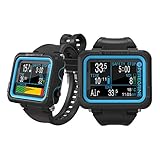
Overview: The Shearwater Peregrine is a premium full-color dive computer designed for recreational divers who demand exceptional clarity and ease of use. With its vibrant LCD display and intuitive two-button interface, this device eliminates the complexity often associated with technical dive computers while delivering robust functionality for air and nitrox diving.
What Makes It Stand Out: The Peregrine’s standout feature is its brilliant full-color display that remains easily readable in all conditions. The state-aware, two-button navigation system with 316 stainless steel buttons provides tactile feedback and logical menu progression. The included USB wireless charging station offers modern convenience, delivering up to 30 hours of dive time per charge—exceptional for multi-day dive trips.
Value for Money: At $575, the Peregrine sits in the premium recreational tier. While significantly more expensive than entry-level computers, it justifies the cost through its superior display quality, build materials, and user experience. Compared to computers costing $400-500 with monochrome screens, the color display and wireless charging represent meaningful upgrades for serious enthusiasts.
Strengths and Weaknesses: Pros: Outstanding full-color display; intuitive two-button interface; excellent 30-hour battery life; wireless charging convenience; rugged 316 stainless steel buttons; clear decompression data. Cons: No air integration capability; limited to recreational diving limits; premium price may exceed casual diver budgets; lacks advanced technical diving features.
Bottom Line: The Shearwater Peregrine is an excellent investment for dedicated recreational divers who prioritize display quality and user experience. While not cheap, its combination of clarity, simplicity, and build quality makes it a top-tier choice that will serve reliably for years.
2. findtime Scuba Diving Computer Watch 100M Waterproof with Compass Altimeter Barometer ABC NDL Time Professional Watches for Swimmers Divers Sailing Surf Hiking

Overview: The findtime Scuba Diving Computer Watch is a budget-friendly multi-sport wearable that attempts to bridge diving functionality with outdoor adventure features. Marketed as an all-in-one solution for divers, hikers, and water sports enthusiasts, it packs an impressive array of sensors into a sub-$150 package.
What Makes It Stand Out: This watch’s primary differentiator is its ABC sensor suite—Altimeter, Barometer, and Compass—rarely found in dedicated dive computers at this price point. The 10ATM (100M) water resistance supports recreational diving, while the 316L stainless steel case provides corrosion resistance. It handles multiple dive modes including NDL calculations and free diving, plus surface activities like hiking and sailing.
Value for Money: At $135.99, this is one of the most affordable diving-capable watches available. It essentially combines a basic dive computer with a hiking watch, potentially saving buyers hundreds compared to purchasing separate devices. However, the unknown brand reputation and 100M depth limitation mean it best suits entry-level or casual divers rather than serious technical divers.
Strengths and Weaknesses: Pros: Extremely affordable; versatile multi-sport functionality; useful ABC sensors; durable 316L steel construction; suitable for snorkeling and shallow diving. Cons: 100M depth rating limits deep dives; brand lacks established dive community trust; interface likely less refined than premium brands; algorithm sophistication uncertain; may compromise dive safety for feature quantity.
Bottom Line: This findtime watch serves casual divers and outdoor enthusiasts on a tight budget. While not a replacement for a dedicated dive computer from established brands, it’s a competent backup or entry-level option for shallow recreational diving and surface adventures.
3. SeaLife SportDiver Ultra Underwater Smartphone Scuba Housing – Dive to 130’, Waterproof Photography, Easy Camera Controls, with Leak Alarms, Fits Most Phones

Overview: The SeaLife SportDiver Ultra is a professional-grade smartphone housing that transforms your mobile device into a capable underwater camera system. Recognized by PADI ScubaLab as “Tester’s Choice,” this housing enables divers to capture high-quality photos and videos at depths up to 130 feet while maintaining full camera control.
What Makes It Stand Out: Safety features set this housing apart: newly designed audible and visual moisture/pressure sensors provide immediate warnings if the seal is compromised. The anti-fog Moisture Muncher capsule prevents internal condensation, while the cam-lock sealing mechanism ensures watertight integrity. Seven mounting points accommodate accessories, and the large shutter lever works with gloved hands.
Value for Money: While pricing isn’t listed, SeaLife housings typically range $300-400. This represents excellent value compared to $1000+ dedicated underwater camera systems. Your smartphone’s advanced computational photography capabilities, combined with the housing’s professional features, deliver results that rival traditional setups at a fraction of the cost.
Strengths and Weaknesses: Pros: PADI-recognized quality; audible/visual leak alarms; effective anti-fog system; full camera control access; comprehensive accessory package; 130’ depth rating; shock-absorbing phone retention. Cons: Pricey for a housing; drains phone battery quickly; bulkier than compact cameras; dependent on phone model compatibility; requires careful O-ring maintenance.
Bottom Line: The SportDiver Ultra is the best smartphone housing for serious underwater photographers. Its unmatched safety features and professional-grade construction justify the investment, making it ideal for divers wanting excellent results without purchasing separate camera equipment.
4. SUNROAD D3 Scuba Diving Computer Watch Man 100m Depth NDL OTU CNS Safety Analyse Compass Temperature Fashion Wristwatch

Overview: The SUNROAD D3 is a feature-rich dive computer watch targeting technical and recreational divers seeking comprehensive data tracking. This Chinese-manufactured device packs multiple dive modes and advanced metrics like OTU (Oxygen Toxicity Unit) and CNS (Central Nervous System) tracking into a wristwatch form factor.
What Makes It Stand Out: The D3 offers remarkable mode versatility: Air, Nitrox (21-50% O2), Gauge, Free diving, and Altitude diving. The inclusion of OTU and CNS calculations—typically found in higher-end computers—provides critical safety data for nitrox divers. A digital compass, water temperature display, and 30-day USB charging standby add practical utility.
Value for Money: With unlisted pricing but typically retailing under $200, the D3 delivers exceptional feature density. It rivals computers costing twice as much from established brands, making it attractive for budget-conscious divers wanting technical capabilities. However, long-term brand support and algorithm reliability remain unproven compared to Suunto or Shearwater.
Strengths and Weaknesses: Pros: Comprehensive dive modes; technical OTU/CNS tracking; digital compass; USB charging; 100m depth rating; metric/imperial flexibility; backlight for low visibility. Cons: Obscure brand with limited service network; potentially complex interface; build quality uncertain; algorithm validation unknown; may overwhelm casual users.
Bottom Line: The SUNROAD D3 suits divers wanting advanced features on a budget. While brand reputation lags behind industry leaders, its technical capabilities make it a viable primary or backup computer for those comfortable with lesser-known manufacturers.
5. Aqualung I100 Mixed Underwater Computer, Intuitive One-Button Navigation, Four Operating Modes, Altitude Adjustment, Aqua Lung Diving Computer for Scuba Diving

Overview: The Aqualung I100 is a mid-range dive computer from one of diving’s most trusted manufacturers, designed for recreational divers who value simplicity and reliability. Its one-button navigation system eliminates menu confusion, making it accessible for beginners while providing essential data for experienced divers.
What Makes It Stand Out: The single-button interface is brilliantly simple—press to advance, hold to select—creating an intuitive user experience that works flawlessly underwater. Four operating modes (Air, Nitrox, Gauge, Free Dive) cover most recreational needs. The water activation feature automatically starts dive mode upon immersion, while user-replaceable standard batteries eliminate service center visits and long-term ownership costs.
Value for Money: At $293.24, the I100 positions itself as a smart mid-range investment. Aqualung’s legendary reliability and service network justify the premium over budget brands. The user-replaceable battery saves approximately $50-75 annually compared to computers requiring factory service, making it economical long-term.
Strengths and Weaknesses: Pros: Extremely simple one-button operation; reputable Aqualung brand; water activation convenience; user-replaceable battery; audible and LED alarm system; four versatile modes; altitude adjustment. Cons: Single-button navigation can be slow; basic display (likely monochrome); limited advanced features for technical diving; no air integration; fewer customization options than premium models.
Bottom Line: The I100 is perfect for recreational divers seeking hassle-free reliability from an industry leader. Its simplicity doesn’t compromise safety, making it ideal for beginners and a trustworthy backup for experienced divers who value straightforward operation over flashy features.
6. My dive logbook: Ideal logbook to record and keep the data of all your dives, for beginners and advanced

###6. My dive logbook: Ideal logbook to record and keep the data of all your dives, for beginners and advanced
Overview: This traditional dive logbook serves as a physical repository for documenting underwater adventures. Designed for divers of all experience levels, it provides structured pages to record essential dive data including depth, time, conditions, and marine life encounters. The straightforward format makes it accessible for beginners while offering sufficient detail for advanced divers who appreciate tangible records and want to track their progression systematically.
What Makes It Stand Out: The personalized “My dive logbook” branding creates a sense of ownership that generic logs lack. Its universal design bridges the gap between novice and expert divers, eliminating the need to purchase different logs as skills progress. Unlike digital alternatives, this waterproof-resistant paper log won’t suffer battery failures or software crashes during critical post-dive documentation on boats or remote locations.
Value for Money: At $9.17, this logbook represents a modest investment in dive safety and memory preservation. While free digital logs exist, this physical backup ensures your dive history remains accessible regardless of technology changes or app discontinuation. The price point aligns with standard dive logbooks, though slightly premium for its inclusive branding that targets all skill levels.
Strengths and Weaknesses: Strengths include: no technical knowledge required, permanent ink records immune to digital corruption, psychological satisfaction of handwritten entries, and independence from electronic devices. Weaknesses: manual calculations required, risk of water damage if not properly protected, bulkier than smartphone apps, entries can’t be automatically backed up or shared online, and potential loss of the physical book.
Bottom Line: Perfect for divers who value tradition and want a reliable, low-tech solution. It’s especially recommended as a secondary backup to digital logging or for those who enjoy the ritual of handwriting dive memories and building a personal archive.
7. My dives: Ideal logbook to record and keep the data of all your dives, for beginners and advanced

Overview: This compact dive logbook offers a streamlined approach to tracking underwater experiences. Tailored for both entry-level and seasoned divers, it provides organized sections for logging critical dive parameters such as bottom time, maximum depth, water temperature, and equipment used. Its minimalist design focuses on essential data capture without overwhelming new divers with overly technical fields while still satisfying experienced record-keepers.
What Makes It Stand Out: The intimate “My dives” title emphasizes personal connection to each underwater journey. This logbook’s beginner-friendly layout includes helpful prompts and reminders that guide proper data entry, making it an excellent training tool. The advanced diver will appreciate the inclusion of detailed fields for decompression stops and gas mixtures, growing with the user’s certification level without requiring an upgrade.
Value for Money: Priced at $7.86, this represents excellent value for budget-conscious divers. It’s approximately 15% cheaper than similar branded logs while maintaining comparable quality and functionality. For new divers testing the waters of log-keeping, this lower price point reduces the barrier to entry. The cost savings could instead fund an extra air fill or two, making it a practical choice.
Strengths and Weaknesses: Strengths: affordable entry point, inclusive design for all certification levels, lightweight construction for travel, and intuitive layout. Weaknesses: fewer pages than premium logs, thinner paper stock may bleed with certain pens, lacks integrated dive tables, and the soft cover provides less protection against marine environments. The simplified design might feel limiting for technical divers needing extensive customization or specialized fields.
Bottom Line: An ideal first logbook for new divers or a cost-effective backup for experienced ones. It strikes a practical balance between functionality and affordability, making it a smart choice for those who want reliable paper logging without unnecessary frills or excessive cost.
8. Dive Log: Book for Scuba Divers to Record and Track Over 100 Dives

Overview: This comprehensive dive logbook is built for the committed diver, offering capacity for documenting more than 100 dives in a single volume. It features a systematic layout that captures all critical dive metrics including site details, buddy information, equipment configurations, and post-dive notes. The structured format ensures consistent data recording across every underwater excursion, making it ideal for divers pursuing advanced certifications or logging frequent local and international trips.
What Makes It Stand Out: The explicit “over 100 dives” capacity distinguishes it from standard 50-dive logs, providing exceptional longevity. This high-capacity design reduces the need to purchase multiple logs annually for active divers. The book includes dedicated sections for dive shop stamps and instructor signatures, essential for certification courses and master diver applications that require verified dive experience documentation.
Value for Money: At $6.99, this logbook delivers outstanding value for high-frequency divers. The cost-per-dive works out to less than seven cents, making it significantly more economical than purchasing several lower-capacity logs. Compared to subscription-based digital logging services, this one-time purchase pays for itself within months and never requires renewal fees or cloud storage subscriptions.
Strengths and Weaknesses: Strengths: exceptional page count, cost-effective for avid divers, professional layout suitable for certification tracking, durable spiral binding allows flat writing. Weaknesses: larger size may be cumbersome for travel, blank pages could feel wasteful for casual divers, no waterproof coating on covers, and the generic design lacks personalization. May be overkill for vacation-only divers who log fewer than ten dives per year.
Bottom Line: Highly recommended for frequent divers, instructors, or those working toward advanced certifications. The high capacity and low price create unbeatable value, though occasional divers might prefer a smaller log that fills faster for a greater sense of accomplishment and easier archiving.
9. Dive Log: Book for Scuba Divers to Record and Track Over 100 Dives

Overview: This robust dive logbook provides extensive documentation space for more than 100 dives, catering to dedicated scuba enthusiasts who log regularly. The format accommodates complete dive profiles with sections for environmental conditions, equipment checks, dive buddy details, and personal observations. Its utilitarian design prioritizes function over frills, making it suitable for both training dives and recreational exploration documentation in any marine environment.
What Makes It Stand Out: This logbook’s straightforward “Dive Log” branding appeals to purists who prefer no-nonsense gear. The 100+ dive capacity ensures years of use for most recreational divers. It features standardized data fields that align with PADI, SSI, and other major certification agencies’ requirements, simplifying instructor reviews and certification paperwork submissions without requiring format adjustments.
Value for Money: At $6.99, this logbook matches its competitors on price while delivering superior page count. For divers who log consistently, the extended capacity means fewer replacements and lower long-term costs. The investment equals about two rental weights, making it a negligible expense in a diver’s annual budget while providing permanent, tangible records that digital systems can’t replicate.
Strengths and Weaknesses: Strengths: generous dive capacity, agency-neutral formatting, sturdy construction withstands repeated boat trips, excellent for certification documentation. Weaknesses: utilitarian appearance lacks aesthetic appeal, no quick-reference dive tables included, paper quality is functional but not archival-grade, and the thick profile may not fit in standard logbook covers. Identical specifications to other 100-dive logs on market with minimal differentiation.
Bottom Line: A workhorse logbook for serious divers who prioritize capacity and value. It’s functionally equivalent to similarly priced alternatives, so choose based on availability. Perfect for divers who want to maintain a single, comprehensive dive history without switching between multiple volumes or dealing with digital subscription costs.
10. 50PCS Dancing Stickers for Dancer,Waterproof PVC Stickers for Water Bottles Laptop Car Phone Case Skateboard - Perfect Dancer Gifts,Dance Decals, Dance Party Favors

Overview: This collection of 50 dance-themed stickers celebrates movement culture across multiple disciplines. The waterproof PVC decals feature diverse designs spanning ballet, hip-hop, jazz, and contemporary styles, incorporating motivational phrases and artistic dancer silhouettes. Engineered for durability, these stickers resist fading and peeling while adhering to various surfaces including water bottles, laptops, phone cases, and dance equipment.
What Makes It Stand Out: The comprehensive style coverage ensures representation for virtually every dance genre, making it universally appealing. Unlike generic sticker packs, this collection specifically targets dancers with relevant iconography and empowering messages. The waterproof construction means these decals survive dishwasher cycles and sweaty dance bags, maintaining vibrant colors through rigorous daily use and repeated cleaning.
Value for Money: At $3.49, each sticker costs less than seven cents, delivering exceptional value. Comparable quality stickers typically retail for 15-25 cents each, making this pack highly economical. The versatility across personal items maximizes utility, essentially providing custom decoration for multiple belongings at the price of a single premium sticker from competitors.
Strengths and Weaknesses: Strengths: extensive variety across dance styles, true waterproof performance, easy repositioning without residue, excellent gift potential for dance teams, and fade-resistant printing. Weaknesses: PVC material raises environmental concerns, some designs may feel juvenile for professional dancers, packaging lacks organization for design selection, and adhesive may weaken on curved surfaces over time. Limited appeal beyond dance community.
Bottom Line: An outstanding value for dancers seeking affordable personalization. These stickers excel as party favors, team gifts, or individual expression tools. While not eco-friendly, their durability and design variety make them a worthwhile purchase for anyone passionate about dance culture who wants to customize their gear.
What Exactly Is a Dive Computer?
A dive computer is essentially a miniature, waterproof computer that continuously monitors your depth, bottom time, and ascent rate to calculate safe diving parameters. Unlike traditional dive tables that assume a square profile (one depth for the entire dive), computers track your actual depth throughout the dive, often giving you more bottom time while keeping you within safe decompression limits. They use complex algorithms based on dissolved gas theory to model nitrogen absorption and release in your body tissues. For beginners, this means your computer adapts to your actual diving behavior—not theoretical squares—making your underwater experience both safer and more flexible.
Why Beginners Need a Dedicated Dive Computer
Many new divers assume they can rely on rental gear or a dive buddy’s computer, but this is a critical safety oversight. Your dive computer is personal safety equipment that tracks your unique dive profile, physiology, and exposure. Sharing a computer is like sharing a seatbelt—it doesn’t make sense. As a beginner, you’re still developing instinctual dive habits, and a computer provides essential guardrails. It alerts you when you’re ascending too quickly, warns you about safety stops, and calculates no-fly times after diving. Most importantly, it builds your confidence, allowing you to focus on skills rather than constantly calculating tables in your head.
Decoding Waterproof Ratings: What “Waterproof” Really Means
The term “waterproof” is misleadingly simple. Dive computers are rated by water resistance, typically in ATM (atmospheres) or meters/feet. A 10 ATM (100m) rating is the absolute minimum for recreational diving, but most quality dive computers are rated to at least 20 ATM (200m). However, these ratings are static pressure tests in perfect conditions—dynamic pressure from moving your arm underwater, temperature changes, and aging seals can reduce real-world performance. For beginners, look for computers rated to at least 100m, but understand that 200m+ ratings indicate more robust construction and better long-term reliability. The rating should specifically state “dive computer” or “dive watch” rating, not just general water resistance.
Algorithm Types: The Brain Behind the Safety
Dive computers run on decompression algorithms—the mathematical models that predict nitrogen absorption. The most common are Bühlmann ZHL-16, VPM-B, and various RGBM (Reduced Gradient Bubble Model) iterations. Bühlmann is more liberal, often giving longer bottom times but requiring more conservative personal settings. RGBM algorithms (like those in Suunto computers) are more conservative, building in extra safety margins that many beginners appreciate. Some computers offer adjustable conservatism settings, allowing you to customize the algorithm’s safety factor. As a beginner, a slightly more conservative algorithm isn’t a bad thing—it provides buffer room while you’re still mastering buoyancy and air consumption.
Key Features That Actually Matter for New Divers
Essential Safety Alerts
Your first computer must have audible and visual alarms for ascent rate, no-decompression limit, and safety stops. Look for customizable alarms that you can set to your comfort level. A clear, impossible-to-miss safety stop timer is non-negotiable.
Nitrox Compatibility
Even if you’re only diving air now, you’ll likely get Nitrox certified within your first 20 dives. Buying a computer with Nitrox capability (ideally supporting 22-50% oxygen) future-proofs your investment. The interface should make switching gas mixes straightforward, not buried in menu hell.
Backlight and Display Clarity
You’ll dive in low visibility, murky water, and night conditions. A bright, adjustable backlight and high-contrast display are crucial. Test readability in a store—if you can’t read it at arm’s length in dim light, walk away.
Display Types: Segment, Dot Matrix, or Full Color?
Entry-level computers typically use segment displays (like digital watches) which are clear but limited in information density. Dot matrix displays offer more flexibility, showing graphs and clearer text. Full-color LCD screens are premium features that provide exceptional clarity but drain batteries faster.
For beginners, a high-quality dot matrix display hits the sweet spot. It shows your essential data (depth, time, NDL) prominently while having enough resolution to display safety information clearly. Color screens are nice but unnecessary for learning—the money is better spent on reliability and battery life. Prioritize contrast and size over pixel count; a large, bold depth reading is more valuable than a tiny, colorful graph.
Battery Life: User-Replaceable vs. Rechargeable
This decision impacts long-term cost and convenience. User-replaceable batteries (typically CR2450 or similar) last 1-3 years and cost $5-15 to replace yourself. They’re perfect for travel—no charger needed. Rechargeable lithium-ion batteries last 10-30 hours per charge and eliminate battery replacement costs but require charging cables and power access.
Consider your dive frequency. Occasional divers (fewer than 20 dives/year) may prefer user-replaceable batteries that won’t self-discharge. Frequent divers benefit from rechargeable models. Whichever you choose, ensure the battery indicator is prominent and accurate. Nothing ruins a dive trip like a dead computer on day one.
Connectivity and Data Management
Modern dive computers sync with smartphones or laptops via Bluetooth, USB, or NFC. This isn’t just geekery—it transforms your post-dive experience. Downloading dive logs helps you track improvement, identify air consumption patterns, and share profiles with instructors for feedback.
Look for computers with intuitive apps that work on your phone’s operating system. Some entry-level models use proprietary software that feels clunky and outdated. The best systems automatically sync when you open the app, showing your dive profile within minutes. While not essential for safety, connectivity accelerates your learning curve by making dive data accessible and actionable.
Watch-Style vs. Console-Mounted: Form Factor Fundamentals
Watch-style computers are worn on your wrist, offering at-a-glance information and freedom of movement. They’re compact, double as everyday timepieces, and are easily protected. Console-mounted computers attach to your regulator’s high-pressure hose, integrating with your pressure gauge. They’re larger, harder to lose, and keep all information in one place.
Beginners often benefit from watch-style computers because they encourage regular monitoring—you’re more likely to glance at your wrist than pull up a console. However, if you struggle with gear organization or have vision issues, a console’s larger display might be better. Consider your diving style: traveling divers prefer watches; cold-water divers in thick gloves might favor consoles.
User Interface: Menu Systems and Button Logic
A beginner’s computer should be operable with cold, numb fingers wearing thick gloves. Test the button feel—are they tactile and distinct, or mushy and confusing? Menu navigation should be logical: one button for mode, one for select, one for adjust. Avoid models requiring long-presses or complex sequences to access basic functions.
Some computers use a single button with different press durations, which seems simple but becomes infuriating underwater. Others have four+ buttons that feel overwhelming. The sweet spot is two or three well-spaced, clearly labeled buttons. Before buying, ask the dealer to walk you through changing gas mix, setting alarms, and accessing the safety stop timer. If it feels confusing in the shop, it’ll be impossible at 60 feet.
Price Ranges and Budgeting Realistically
Entry-level dive computers start around $200 and go up to $500 for feature-rich beginner models. Below $200, you’re often sacrificing critical features like Nitrox compatibility or reliable waterproofing. The $250-350 range offers excellent value—robust construction, essential features, and user-replaceable batteries.
Budget an additional $50-100 for accessories: a screen protector, spare battery kit, and possibly a download cable if Bluetooth isn’t included. Don’t fall for the “buy the cheapest now, upgrade later” trap. A $200 computer that lacks Nitrox support becomes a $200 paperweight when you get certified. Invest in a model that grows with you for at least your first 100 dives.
Maintenance and Care: Extending Your Investment
Rinse your computer in fresh water after every dive, paying attention to button crevices where salt crystals form. Dry it completely before opening battery compartments—moisture causes corrosion. Store it in a cool, dark place; extreme heat degrades battery life and display clarity.
Annually inspect the O-ring if your model has user-replaceable batteries. Replace it at the first sign of cracking or flattening—a $2 O-ring protects a $300 computer. For rechargeable models, avoid letting the battery fully discharge for months; store at 50% charge if not diving for extended periods. Never leave any computer in direct sunlight in a hot car—heat damages seals and screens.
Common Beginner Mistakes When Choosing
Mistake 1: Overbuying Features
That $800 computer with trimix, CCR, and 3D compass? Overkill for your first 50 dives. You’re paying for complexity you can’t legally use yet.
Mistake 2: Ignoring the Manual
Before buying, download the manual online. If it’s 200 pages of poorly translated technobabble, reconsider. You need to understand your computer’s logic.
Mistake 3: Choosing Style Over Substance
A computer that looks great apres-dive but has tiny font underwater is a liability. Function must trump form for safety equipment.
Mistake 4: Not Trying It On
A watch-style computer that slides around your wrist or pinches under a wetsuit will annoy you into not wearing it properly. Always test fit with your actual dive gear.
When to Upgrade: Planning Your Dive Computer Journey
Your first computer should serve you through Open Water, Advanced Open Water, and at least 50 logged dives. Upgrade triggers include: needing air integration for better gas management, wanting multi-gas support for technical training, or requiring a digital compass for navigation specialty courses. Many divers keep their first computer as a backup even after upgrading—proof that a solid beginner model never truly becomes obsolete. Plan to re-evaluate your needs every two years or after major certification milestones.
Safety Protocols: Your Computer Is a Tool, Not a Crutch
Never let a computer’s existence replace fundamental dive planning. Always plan your dive with tables or planning software first, using your computer as a real-time monitor. Understand that all computers can fail—carry a backup timer and depth gauge. Know how to manually calculate a safety stop and emergency decompression procedures.
If your computer fails mid-dive, ascend immediately at a safe rate, make a safety stop, and end the dive. Do not borrow a buddy’s computer and continue. Most importantly, never push limits just because the computer says you have time. It’s a mathematical model, not a magic shield. The best safety feature is always your own judgment.
Frequently Asked Questions
Do I really need a dive computer as a beginner, or can I use tables? While dive tables teach essential principles, a computer provides real-time tracking of your actual dive profile, which rarely matches the square profiles tables assume. For safety and flexibility, a computer is considered mandatory equipment by most training agencies for new divers.
What’s the difference between waterproof and water-resistant ratings? Water-resistant means splash-proof; waterproof means submersible. For diving, you need a specific dive rating (e.g., 100m/10 ATM minimum). “Water-resistant to 50m” is insufficient and dangerous for scuba diving.
How much should I realistically budget for my first dive computer? Plan to spend $250-350 for a quality beginner model with Nitrox capability and reliable construction. Cheaper models often lack critical features, while more expensive ones include advanced functions you won’t use for years.
Can I use my smartwatch or fitness tracker for diving? No. Consumer smartwatches lack the depth rating, decompression algorithms, and safety certifications required for scuba diving. Using one is extremely dangerous and could be life-threatening.
How long do dive computer batteries typically last? User-replaceable batteries last 1-3 years or 200-500 dives. Rechargeable batteries provide 10-30 hours of dive time per charge. Battery life depends heavily on backlight usage and water temperature.
Is air integration worth it for a beginner? Integrated air monitoring (showing tank pressure on your computer) is helpful but not essential initially. It adds cost and complexity. Master basic air management with a separate gauge first, then consider integration for your second computer.
What happens if my dive computer fails during a dive? Ascend immediately at a safe rate (no faster than 30 feet per minute), perform a safety stop at 15 feet for 3-5 minutes, and end the dive. Do not continue diving using someone else’s computer.
How often should I replace my dive computer? With proper care, a quality computer lasts 5-10 years. Replace it if the manufacturer discontinues software support, if battery compartments corrode, or if you need features for advanced training that your model lacks.
Can I travel on airplanes with my dive computer? Yes, but pack it in your carry-on. The pressure changes in cargo holds can damage seals. Activate “transport mode” if available to prevent battery drain from pressure changes.
What’s the most important feature to prioritize as a beginner? An intuitive, highly visible display with clear ascent rate and safety stop alerts. All other features are secondary to being able to instantly understand your critical safety information underwater.